入口1
2
3
4
5
6
7
8
9
10static class Program
{
static void Main(string[] args)
{
using (Game1 game = new Game1())
{
game.Run();
}
}
}
Game.Run()调用Platform.RunLoop()
internal GamePlatform Platform;
GamePlatform 是抽象类. 如果是Windows平台, 则是WinFormsGamePlatform
WinFormsGamePlatform的RunLoop
1 | public override void RunLoop() |
WinFormsGameWindow中有WinFormsGameForm
进入WinFormsGameWindow的RunLoop, 看到PeekMessage, 看到Game.Tick()
1 | internal void RunLoop() |
回到Game的Tick函数, 里面调用了DoUpdate和DoDraw1
2
3
4
5
6
7
8
9
10
11
12
13
14
15
16
17
18
19
20
21
22
23
24
25
26
27
28
29
30
31
32
33
34
35
36
37
38
39
40
41
42
43
44
45
46
47
48
49
50
51
52
53
54
55
56
57
58
59
60
61
62
63
64
65
66
67
68
69
70
71
72
73
74
75
76
77
78
79
80
81
82
83
84
85
86
87
88
89
90
91
92 public void Tick()
{
// NOTE: This code is very sensitive and can break very badly
// with even what looks like a safe change. Be sure to test
// any change fully in both the fixed and variable timestep
// modes across multiple devices and platforms.
RetryTick:
// Advance the accumulated elapsed time.
var currentTicks = _gameTimer.Elapsed.Ticks;
_accumulatedElapsedTime += TimeSpan.FromTicks(currentTicks - _previousTicks);
_previousTicks = currentTicks;
// If we're in the fixed timestep mode and not enough time has elapsed
// to perform an update we sleep off the the remaining time to save battery
// life and/or release CPU time to other threads and processes.
if (IsFixedTimeStep && _accumulatedElapsedTime < TargetElapsedTime)
{
var sleepTime = (int)(TargetElapsedTime - _accumulatedElapsedTime).TotalMilliseconds;
// NOTE: While sleep can be inaccurate in general it is
// accurate enough for frame limiting purposes if some
// fluctuation is an acceptable result.
Task.Delay(sleepTime).Wait();
System.Threading.Thread.Sleep(sleepTime);
goto RetryTick;
}
// Do not allow any update to take longer than our maximum.
if (_accumulatedElapsedTime > _maxElapsedTime)
_accumulatedElapsedTime = _maxElapsedTime;
if (IsFixedTimeStep)
{
_gameTime.ElapsedGameTime = TargetElapsedTime;
var stepCount = 0;
// Perform as many full fixed length time steps as we can.
while (_accumulatedElapsedTime >= TargetElapsedTime)
{
_gameTime.TotalGameTime += TargetElapsedTime;
_accumulatedElapsedTime -= TargetElapsedTime;
++stepCount;
DoUpdate(_gameTime);
}
//Every update after the first accumulates lag
_updateFrameLag += Math.Max(0, stepCount - 1);
//If we think we are running slowly, wait until the lag clears before resetting it
if (_gameTime.IsRunningSlowly)
{
if (_updateFrameLag == 0)
_gameTime.IsRunningSlowly = false;
}
else if (_updateFrameLag >= 5)
{
//If we lag more than 5 frames, start thinking we are running slowly
_gameTime.IsRunningSlowly = true;
}
//Every time we just do one update and one draw, then we are not running slowly, so decrease the lag
if (stepCount == 1 && _updateFrameLag > 0)
_updateFrameLag--;
// Draw needs to know the total elapsed time
// that occured for the fixed length updates.
_gameTime.ElapsedGameTime = TimeSpan.FromTicks(TargetElapsedTime.Ticks * stepCount);
}
else
{
// Perform a single variable length update.
_gameTime.ElapsedGameTime = _accumulatedElapsedTime;
_gameTime.TotalGameTime += _accumulatedElapsedTime;
_accumulatedElapsedTime = TimeSpan.Zero;
DoUpdate(_gameTime);
}
// Draw unless the update suppressed it.
if (_suppressDraw)
_suppressDraw = false;
else
{
DoDraw(_gameTime);
}
}
类层次结构如下:
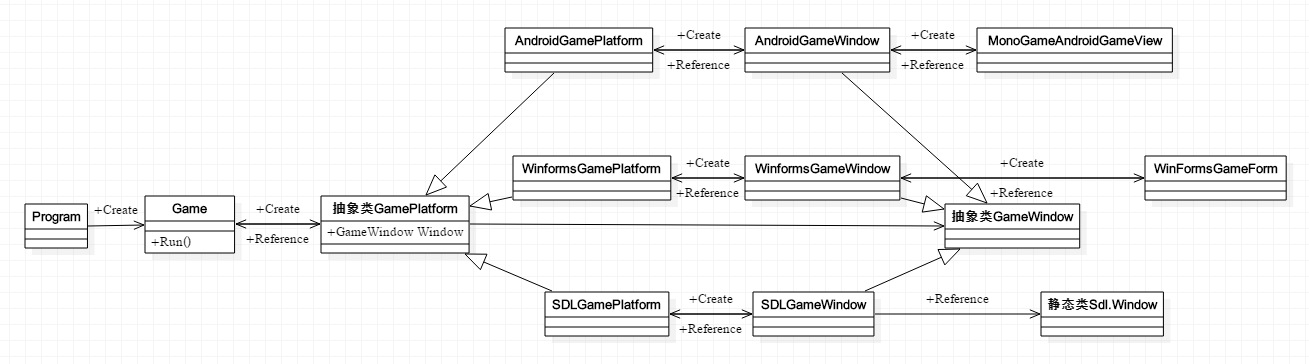
另外也查看了一下XNA中Game类的相关类结构
public Game.Run()调用private Game.RunGame(), 后者调用 this.host.StartGameLoop();
host是GameHost, GameHost是抽象类, 具体是WindowsGameHost;WindowsGameHost内有WindowsGameWindow, WindowsGameWindow内有WindowsGameForm
WindowGameHost的Run方法1
2
3
4
5
6
7
8
9
10
11
12
13
14
15
16
17
18internal override void Run()
{
if (this.doneRun)
{
throw new InvalidOperationException(Resources.NoMultipleRuns);
}
try
{
Application.Idle += new EventHandler(this.ApplicationIdle);
Application.Run(this.gameWindow.Form);//winform的形式
}
finally
{
Application.Idle -= new EventHandler(this.ApplicationIdle);
this.doneRun = true;
base.OnExiting();
}
}
这里XNA和MonoGame是一一对应的
GameHost = GamePlatform
WindowsGameHost = WinFormsGamePlatform
WindowsGameWindow = WinFormsGameWindow
WindowsGameForm = WinFormsGameForm
Game实现了游戏的大体框架, 或者说模板. 用户只要继承Game类, 将实现逻辑放入相应的虚方法Update和Draw中, 就可以进行逻辑更新和图形绘制. 这两个虚方法由Game的Tick方法组合起来. 那么需要有一个地方调用Game的Tick方法, 这个地方就是Windows的消息循环
过程由Game.Run进入, 经过GamePlatform, 直至GameWindow的消息循环, 此处再调用Game.Tick, 饶了一圈回到Game. Game虽然是Facade, 里面什么都有, 但唯独少了一个心脏, 需要借助外力. 这种设计方式可以学习.