上一篇笔记中TimerComponent, FrameRateCounter分别继承于GameComponent, DrawableGameComponent.关于GameComponent和DrawableGameComponent, 官方的介绍如下:
Game components provide a modular way of adding functionality to a game. You create a game component by deriving the new component either from the GameComponent class, or, if the component loads and draws graphics content, from the DrawableGameComponent class. You then add game logic and rendering code to the game component by overriding GameComponent.Update,DrawableGameComponent.Draw and GameComponent.Initialize. A game component is registered with a game by passing the component to Game.Components.Add. A registered component will have its draw, update, and initialize methods called from the Game.Initialize, Game.Update, and Game.Draw methods.
https://msdn.microsoft.com/en-us/library/bb203873.aspx
游戏组件提供了一种模块化的开发方式, 使得程序结构更加清晰. 除了上面提到的TimerComponent, FrameRateCounter, 包括像Input, SpriteManager, ScreenManager等等都可以用游戏组件的方式来提供.
Learn XNA 4.0中介绍的SpriteManager1
2
3
4
5
6
7
8
9
10
11
12
13
14
15
16
17
18
19
20
21
22
23
24
25
26
27
28
29
30
31
32
33
34
35
36
37
38
39
40
41
42
43
44
45
46
47
48
49
50
51
52
53
54
55
56
57
58
59public class SpriteManager : Microsoft.Xna.Framework.DrawableGameComponent
{
SpriteBatch spriteBatch;
UserControlledSprite player;
List<Sprite> spriteList = new List<Sprite>( );
protected override void LoadContent( )
{
spriteBatch = new SpriteBatch(Game.GraphicsDevice);
player = new UserControlledSprite(
Game.Content.Load<Texture2D>(@"Images/threerings"),
Vector2.Zero, new Point(75, 75), 10, new Point(0, 0),
new Point(6, 8), new Vector2(6, 6));
spriteList.Add(new AutomatedSprite(
Game.Content.Load<Texture2D>(@"Images/skullball"),
new Vector2(150, 150), new Point(75, 75), 10, new Point(0, 0),
new Point(6, 8), Vector2.Zero));
spriteList.Add(new AutomatedSprite(
Game.Content.Load<Texture2D>(@"Images/skullball"),
new Vector2(300, 150), new Point(75, 75), 10, new Point(0, 0),
new Point(6, 8), Vector2.Zero));
base.LoadContent( );
}
public override void Update(GameTime gameTime)
{
// Update player
player.Update(gameTime, Game.Window.ClientBounds);
// Update all sprites
foreach (Sprite s in spriteList)
{
s.Update(gameTime, Game.Window.ClientBounds);
// Check for collisions and exit game if there is one
if (s.collisionRect.Intersects(player.collisionRect))
Game.Exit();
}
base.Update(gameTime);
}
public override void Draw(GameTime gameTime)
{
spriteBatch.Begin(SpriteBlendMode.AlphaBlend,
SpriteSortMode.FrontToBack, SaveStateMode.None);
// Draw the player
player.Draw(gameTime, spriteBatch);
// Draw all sprites
foreach (Sprite s in spriteList)
s.Draw(gameTime, spriteBatch);
spriteBatch.End( );
base.Draw(gameTime);
}
}
//使用方式
spriteManger = new SpriteManager(this);
Components.Add(spriteManger);
注意Sprite自身不是GameComponent或者DrawableGameComponent, 虽然也有Update和Draw方法
RolePlayingGameStarterKit中使用的ScreenManager, 做法和SpriteManager一样, 也是继承DrawableGameComponent. 各种GameScreen, 就类似Sprite, 通过ScreenManager的draw方法进行绘制. GameScreen自己有draw方法, 用的是ScreenManager的spriteBatch.
除了上面介绍的游戏系统可以作为组件, 下面的这种方式也可以提供一种思路
http://blogs.microsoft.co.il/pavely/2010/11/06/xna-2d-game-tutorial-part-4/1
2
3
4
5
6
7
8
9
10
11
12
13
14
15
16
17
18
19
20
21
22
23
24
25
26
27
28
29
30
31
32
33
34
35
36
37
38
39
40
41
42
43
44
45
46
47
48
49
50
51
52
53
54
55//星空, 游戏背景
public class StarfieldComponent : DrawableGameComponent {
Star[] _stars = new Star[128];
Random _rnd = new Random();
Texture2D _starTexture;
SpriteBatch _batch;
public StarfieldComponent(Game game)
: base(game) {
// TODO: Construct any child components here
}
public override void Initialize() {
for(int i = 0; i < _stars.Length; i++) {
Star star = new Star();
star.Color = new Color(_rnd.Next(256), _rnd.Next(256), _rnd.Next(256), 128);
star.Position = new Vector2(_rnd.Next(Game.Window.ClientBounds.Width), _rnd.Next(Game.Window.ClientBounds.Height));
star.Speed = (float)_rnd.NextDouble() * 5 + 2;
_stars[i] = star;
}
base.Initialize();
}
protected override void LoadContent() {
_starTexture = Game.Content.Load<Texture2D>("Images/star");
_batch = new SpriteBatch(Game.GraphicsDevice);
base.LoadContent();
}
public override void Update(GameTime gameTime) {
int height = Game.Window.ClientBounds.Height;
for(int i = 0; i < _stars.Length; i++) {
var star = _stars[i];
if((star.Position.Y += star.Speed) > height) {
// "generate" a new star
star.Position = new Vector2(_rnd.Next(Game.Window.ClientBounds.Width), -_rnd.Next(20));
star.Speed = (float)_rnd.NextDouble() * 5 + 2;
star.Color = new Color(_rnd.Next(256), _rnd.Next(256), _rnd.Next(256), 128);
}
}
base.Update(gameTime);
}
public override void Draw(GameTime gameTime) {
_batch.Begin(SpriteSortMode.Deferred, BlendState.NonPremultiplied);
foreach(var star in _stars)
_batch.Draw(_starTexture, star.Position, null, star.Color, 0, Vector2.Zero, 1.0f, SpriteEffects.None, 1.0f);
_batch.End();
base.Draw(gameTime);
}
}
GameComponent和DrawableGameComponent的类图如下: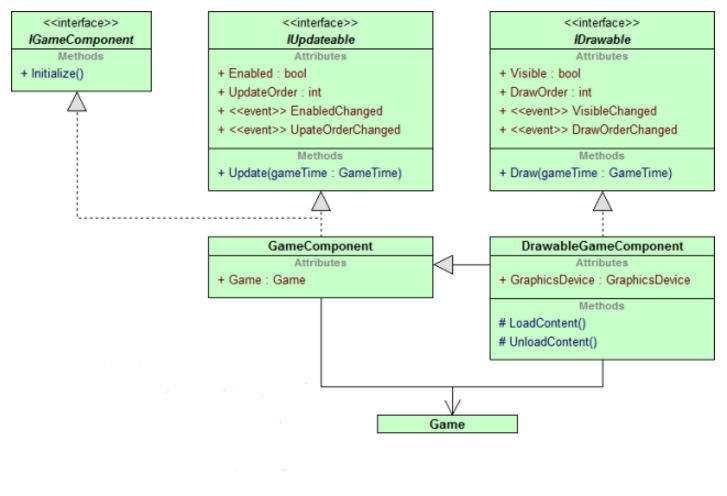
值得一提的是IUpdateable中有一个UpdateOrder, IDrawable中有一个DrawOrder, 这两个Order对于组件来说是不可或缺的. 例如寻路组件, 碰撞组件, 网络组件等之间会有一个先后顺序, 绘制的时候则有特效层, UI层, 场景中又细分为前景层, 中间层, 背景层.
GameComponent其实是一种设计模式(http://gameprogrammingpatterns.com/component.html), Unity3D中则更进一步, 每一个物体都是GameObject, 通过”挂”上各种GameComponent, 在游戏中运行. 另外还有一种ECS(Entity-Component-System 实体组件系统, 参考守望先锋), 则比Unity3D更加彻底(Entity就是Unity3D中的GameObject), 关于ECS还有待进一步学习.
http://gameprogrammingpatterns.com/component.html 最后提到了Unity3D和XNA中运用Component模式的区别: 二者之间的level不一样, XNA的level是在Game级别, 而Unity3D是在Entity级别.
The Unity framework’s core GameObject class is designed entirely around components.
Microsoft’s XNA game framework comes with a core Game class. It owns a collection of GameComponent objects. Where our example uses components at the individual game entity level, XNA implements the pattern at the level of the main game object itself, but the purpose is the same.