MonoGame笔记(X1)Camera2D

以前学习时一些零散的笔记, 新开一个系列.

不管是side-scrolling(横版卷轴),还是tilemap,有一点是非常关键的,就是不同坐标系之间的变换。在三维中有一个视口变换。二维没有那么复杂,但原理差不多。Hero和地图上的tile(贴片),它们的位置是地图坐标,地图就是它们所在的世界,所以也可以说是世界坐标。在游戏逻辑中,Hero位置的改变,碰撞检测都是以地图坐标(世界坐标)进行的. 而在窗口屏幕中绘制Sprite和tile时,是以屏幕坐标为参照系的。因此在Draw方法中,必须将Hero和tile的地图坐标变换成屏幕坐标,从而在屏幕的适当位置显示出来。

1
2
3
4
5
6
7
8
9
10
11
12
13
14
15
16
17
18
19
20
21
22
23
24
25
26
protected override void Update(GameTime gameTime)  
{
// Allows the game to exit
if (GamePad.GetState(PlayerIndex.One).Buttons.Back == ButtonState.Pressed)
this.Exit();

float elapsedTime = (float)gameTime.ElapsedGameTime.TotalSeconds;
float moveRate = 20f;
if (hero!= null)
{
scroll += ((hero.Position - new Vector2(screenSize.X / 2f, screenSize.Y / 2f)) - scroll) * elapsedTime * moveRate;

float xLim = map.GetXLim();
float yLim = map.GetYLim();

if (scroll.X < 0f) scroll.X = 0f;
else if (scroll.X > xLim) scroll.X = xLim;
if (scroll.Y < 0f) scroll.Y = 0f;
else if (scroll.Y > yLim) scroll.Y = yLim;

hero.DoInput();
hero.Update(gameTime);
}

base.Update(gameTime);
}

scroll表示游戏窗口与世界地图的相对位置, hero.Position表示hero的地图坐标, 如下图所示:
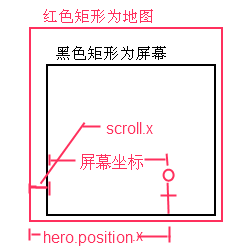
上面这段代码想要解决的一个设计场景是这样的: 以横版卷轴为例, 一开始屏幕位于地图最左侧, 此时Hero从屏幕左侧出生, 随后Hero往右移动. 当Hero未达到屏幕中间时, 屏幕是不会移动的. 当Hero达到屏幕中间, 此后屏幕和Hero一起往右移动, Hero始终占据屏幕的中心位置. 当屏幕达到地图最右侧时, 屏幕不再和Hero一起往右移动, Hero可以单独继续往右移动, 直到达到屏幕最右侧.

上面代码的关键是

1
scroll += ((hero.Position - new Vector2(screenSize.X / 2f, screenSize.Y / 2f)) - scroll)

当未达到屏幕中间时, scroll会是一个负值, 如果是负值就会被重置为0, 屏幕停留在地图最左侧. 同理, 超出地图右侧.

1
if (scroll.X < 0f) scroll.X = 0f;

那为什么要减去scroll呢?因为new Vector2(screenSize.X / 2f, screenSize.Y / 2f)是一个固定值,而hero.Position是一个不断变大的过程(往右移动), 假设前一帧移动后,hero.Position.x - screenSize.X = 10;这一帧移动后,hero.Position.x - screenSize.X = 20, 改变的是绝对值. 为了让不同性能的机子都能够流畅运行, scroll.x是以增量的形式增加的(scroll += ***), 即相对值. 因此需要减去原来的scroll得到一个增量,再将这个增量加回到scroll上.

这部分代码可以抽象出一个Camera2D类. scroll就是Camera2D的地图坐标, 屏幕大小就是Camera2D的ViewPort

1
2
3
4
5
6
7
8
9
10
11
12
13
14
15
16
17
18
19
20
21
22
23
24
25
26
27
28
29
30
31
32
33
34
35
36
37
38
39
40
41
42
43
44
45
46
47
48
49
50
51
52
public class Camera2D
{
public Vector2 position;//世界坐标
public Viewport viewPort;

public Camera2D(Vector2 position)
{
this.position = position;
}

public Camera2D()
{
this.position = Vector2.Zero;
}

public Camera2D(Viewport viewPort)
{
this.viewPort = viewPort;
this.position = Vector2.Zero;
}

public Matrix TransformMatrix
{
get
{
return Matrix.CreateTranslation(new Vector3(-position, 0f));
}
}

// 一般情况下, 使得Hero位于屏幕中间
public void LockCameraToPlayer(PlayerPosition playerPostion, Hero hero)
{
// Hero本身使用的sprite图片也有大小, 加上Center.X;
position.X = playerPostion.Position.X + hero.Center.X
- (viewPort.Width / 2);
position.Y = playerPostion.Position.Y + hero.Center.Y
- (viewPort.Height / 2);
}

public void LockCameraToBound()
{
/*position就是Camera的左上角位置,用viewport的坐标应该也能代替*/
position.X = MathHelper.Clamp(
position.X,
0,
TileEngine.tilemap.WidthInPixels - viewPort.Width);
position.Y = MathHelper.Clamp(
position.Y,
0,
TileEngine.tilemap.HeightInPixels - viewPort.Height);
}
}


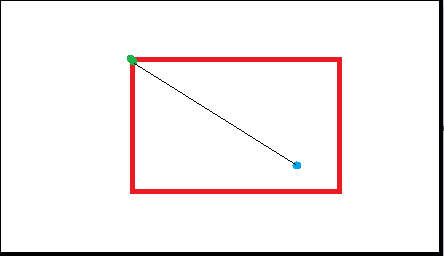
红色是视口,黑色是世界地图; 绿点是相机的Position(世界坐标); 蓝点是物体的Position(世界坐标)

官方有一个Camera2D的样例(http://xbox.create.msdn.com/en-US/education/catalog/sample/tiled_sprites), 支持rotation和zoom, 结构和上面介绍的有所不同

Although a game level might have tens of thousands of tiles in the game world, only those that are visible should be drawn. Otherwise, you see a severe performance hit for submitting more draw calls than are needed to render the scene.

To simplify interactions with the tiles in the game world, the sample provides a 2D Camera implementation. You will find a camera abstraction useful, particularly when rotating or zooming the world. This enables you to rapidly translate screen space to world space.

1
2
3
4
5
6
7
8
9
10
11
12
13
14
15
16
17
18
19
20
21
22
23
24
25
26
27
28
29
30
31
32
33
34
35
36
37
38
39
40
41
42
43
44
45
46
47
48
49
50
51
52
53
54
55
56
57
58
59
60
61
62
63
64
65
66
67
68
69
70
71
72
73
74
75
76
77
78
79
80
81
82
83
84
85
86
87
88
89
90
91
92
93
94
95
96
97
98
99
100
101
102
103
104
105
106
107
108
109
110
111
112
113
114
115
116
117
118
119
120
121
122
123
124
125
126
127
128
129
130
namespace TiledSprites
{
public class Camera2D
{
#region Fields
private Vector2 positionValue;
private bool isMovingUsingScreenAxis;
private float rotationValue;
private float zoomValue;
private bool cameraChanged;
#endregion

#region Public Properties
/// <summary>
/// Get/Set the postion value of the camera
/// </summary>
public Vector2 Position
{
set
{
if (positionValue != value)
{
cameraChanged = true;
positionValue = value;
}
}
get { return positionValue; }
}

/// <summary>
/// Get/Set the rotation value of the camera
/// </summary>
public float Rotation
{
//...同上
}

/// <summary>
/// Get/Set the zoom value of the camera
/// </summary>
public float Zoom
{
//...同上
}

/// <summary>
/// Gets whether or not the camera has been changed since the last
/// ResetChanged call
/// </summary>
public bool IsChanged
{
get { return cameraChanged; }
}

/// <summary>
/// Set to TRUE to pan relative to the screen axis when
/// the camera is rotated.
/// </summary>
public bool MoveUsingScreenAxis
{
set { isMovingUsingScreenAxis = value; }
get { return isMovingUsingScreenAxis; }
}
#endregion

#region Constructor
/// <summary>
/// Create a new Camera2D
/// </summary>
public Camera2D()
{
zoomValue = 1.0f;
rotationValue = 0.0f;
positionValue = Vector2.Zero;
}
#endregion

#region Movement Methods

/// <summary>
/// Used to inform the camera that new values are updated by the application.
/// </summary>
public void ResetChanged()
{
cameraChanged = false;
}

/// <summary>
/// Pan in the right direction. Corrects for rotation if specified.
/// </summary>
public void MoveRight(ref float dist)
{
if (dist != 0)
{
cameraChanged = true;
if (isMovingUsingScreenAxis)
{
positionValue.X += (float)Math.Cos(-rotationValue) * dist;
positionValue.Y += (float)Math.Sin(-rotationValue) * dist;
}
else
{
positionValue.X += dist;
}
}
}
/// <summary>
/// Pan in the left direction. Corrects for rotation if specified.
/// </summary>
public void MoveLeft(ref float dist)
{
//...
}
/// <summary>
/// Pan in the up direction. Corrects for rotation if specified.
/// </summary>
public void MoveUp(ref float dist)
{
//...
}
/// <summary>
/// Pan in the down direction. Corrects for rotation if specified.
/// </summary>
public void MoveDown(ref float dist)
{
//...
}
#endregion
}
}

使用

1
2
3
4
5
6
7
8
9
10
11
12
13
14
15
16
17
18
19
20
21
22
23
24
25
26
27
28
29
30
31
32
33
34
35
36
37
38
39
40
41
42
43
44
45
46
47
48
49
50
51
52
53
54
55
56
57
58
59
60
61
62
63
64
65
66
67
68
protected override void Update(GameTime gameTime)
{
//...
HandleGamePadInput((float)gameTime.ElapsedGameTime.TotalSeconds);

if (camera.IsChanged)
{
CameraChanged();
}
//...
}
public void HandleKeyboardInput(float elapsed)
{
//check for camera movement
float dX = ReadKeyboardAxis(currentKeyboardState, Keys.Left, Keys.Right) *
elapsed * MovementRate;
float dY = ReadKeyboardAxis(currentKeyboardState, Keys.Down, Keys.Up) *
elapsed * MovementRate;
camera.MoveRight(ref dX);
camera.MoveUp(ref dY);
//...
}

/// <summary>
/// This function is called when the camera's values have changed
/// and is used to update the properties of the tiles and animated sprite
/// </summary>
public void CameraChanged()
{
//set rotation
groundLayer.CameraRotation = detailLayer.CameraRotation =
cloudLayer.CameraRotation = rockLayer.CameraRotation =
animatedSprite.Rotation = camera.Rotation;

//set zoom
groundLayer.CameraZoom = detailLayer.CameraZoom =
rockLayer.CameraZoom = camera.Zoom;
animatedSprite.ScaleValue = animatedSpriteScale * camera.Zoom;
cloudLayer.CameraZoom = camera.Zoom + 1.0f;

//set position
groundLayer.CameraPosition = camera.Position;
detailLayer.CameraPosition = camera.Position;
rockLayer.CameraPosition = camera.Position;
//to acheive a paralax effect(视差效果), scale down cloud movement
cloudLayer.CameraPosition = camera.Position / 3.0f;

//...
}

/// <summary>
/// This is called when the game should draw itself.
/// </summary>
/// <param name="gameTime">Provides a snapshot of timing values.</param>
protected override void Draw(GameTime gameTime)
{
//...
groundLayer.Draw(spriteBatch);
detailLayer.Draw(spriteBatch);
rockLayer.Draw(spriteBatch);

animatedSprite.Draw(spriteBatch, Color.AntiqueWhite,
SpriteBlendMode.AlphaBlend);

//draw the clouds
cloudLayer.Draw(spriteBatch);
base.Draw(gameTime);
}