SpriteFont的使用如下(https://msdn.microsoft.com/en-us/library/bb447673.aspx):1
2
3
4
5
6
7
8
9
10
11
12
13
14
15
16
17
18
19
20
21
22
23
24
25
26
27
28
29
30
31SpriteFont Font1;
Vector2 FontPos;
protected override void LoadContent()
{
// Create a new SpriteBatch, which can be used to draw textures.
spriteBatch = new SpriteBatch(GraphicsDevice);
Font1 = Content.Load<SpriteFont>("Arial");
// TODO: Load your game content here
FontPos = new Vector2(graphics.GraphicsDevice.Viewport.Width / 2,
graphics.GraphicsDevice.Viewport.Height / 2);
}
protected override void Draw(GameTime gameTime)
{
GraphicsDevice.Clear(Color.CornflowerBlue);
spriteBatch.Begin();
// Draw Hello World
string output = "Hello World";
// Find the center of the string
Vector2 FontOrigin = Font1.MeasureString(output) / 2;
// Draw the string
spriteBatch.DrawString(Font1, output, FontPos, Color.LightGreen,
0, FontOrigin, 1.0f, SpriteEffects.None, 0.5f);
spriteBatch.End();
base.Draw(gameTime);
}
Arial.spritefont这个资源文件就是用来描述被加载的Arial字体的各种属性1
2
3
4
5
6
7
8
9
10
11
12
13
14
15
16
17
18
19
20
21
22
23
24
25
26
27
28
29
30
31
32
33
34
35
36
37
38
39
40
41
42
43
44
45
46
47
48
49
50
51
52
53
54
55
<!--
This file contains an xml description of a font, and will be read by the XNA
Framework Content Pipeline. Follow the comments to customize the appearance
of the font in your game, and to change the characters which are available to draw
with.
-->
<XnaContent xmlns:Graphics="Microsoft.Xna.Framework.Content.Pipeline.Graphics">
<Asset Type="Graphics:FontDescription">
<!--
Modify this string to change the font that will be imported. Redistributable sample
fonts are available at http://go.microsoft.com/fwlink/?LinkId=104778&clcid=0x409.
-->
<FontName>Arial</FontName>
<!--
Size is a float value, measured in points. Modify this value to change
the size of the font.
-->
<Size>14</Size>
<!--
Spacing is a float value, measured in pixels. Modify this value to change
the amount of spacing in between characters.
-->
<Spacing>0</Spacing>
<!--
UseKerning controls the layout of the font. If this value is true, kerning information
will be used when placing characters.
-->
<UseKerning>true</UseKerning>
<!--
Style controls the style of the font. Valid entries are "Regular", "Bold", "Italic",
and "Bold, Italic", and are case sensitive.
-->
<Style>Bold</Style>
<!--
CharacterRegions control what letters are available in the font. Every
character from Start to End will be built and made available for drawing. The
default range is from 32, (ASCII space), to 126, ('~'), covering the basic Latin
character set. The characters are ordered according to the Unicode standard.
See the documentation for more information.
-->
<CharacterRegions>
<CharacterRegion>
<Start> </Start>
<End>~</End>
</CharacterRegion>
</CharacterRegions>
</Asset>
</XnaContent>
为什么叫SpriteFont呢? 因为Font是以Sprite的方式被绘制的.MonoGame笔记(二)SpriteBatch中提到了DrawString方法的实现1
2
3
4
5
6
7
8
9
10
11
12
13
14
15
16
17
18
19
20
21
22
23
24
25
26
27
28
29
30
31
32
33
34
35
36
37
38
39
40
41
42
43public void DrawString(SpriteFont spriteFont, string text, Vector2 position, Color color)
{
if (spriteFont == null )
{
throw new ArgumentException("spriteFont");
}
Vector2 p = position;
foreach (char c in text)
{
if (c == '\n')
{
p.Y += spriteFont.LineSpacing;
p.X = position.X;
continue;
}
if (spriteFont.characterData.ContainsKey(c) == false)
continue;
GlyphData g = spriteFont.characterData[c];
SpriteBatchItem item = _batcher.CreateBatchItem();
item.Depth = 0.0f;
item.TextureID = (int) spriteFont._texture.ID;
Vector2 texCoordTL = spriteFont._texture.Image.GetTextureCoord ( g.Glyph.X, g.Glyph.Y );
Vector2 texCoordBR = spriteFont._texture.Image.GetTextureCoord ( g.Glyph.X+g.Glyph.Width, g.Glyph.Y+g.Glyph.Height );
item.Set
(
p.X,
p.Y+g.Cropping.Y,
g.Glyph.Width,
g.Glyph.Height,
color,
texCoordTL,
texCoordBR
);
p.X += (g.Kerning.Y + g.Kerning.Z + spriteFont.Spacing);
}
}
也可以使用中文字体1
2
3
4
5
6
7
8
9
10
11
12
13
14
15
16
<XnaContent xmlns:Graphics="Microsoft.Xna.Framework.Content.Pipeline.Graphics">
<Asset Type="Graphics:FontDescription">
<FontName>华文行楷</FontName>
<Size>30</Size>
<Spacing>0</Spacing>
<UseKerning>true</UseKerning>
<Style>Regular</Style>
<CharacterRegions>
<CharacterRegion>
<Start>一</Start>
<End>龥</End>
</CharacterRegion>
</CharacterRegions>
</Asset>
</XnaContent>
不过上述方式包含的汉字太多(2万多个), 一般只需要包含游戏中用到的汉字即可, 具体做法, 参考http://blog.csdn.net/jianxin160/article/details/6313518
但这些系统自带的字体中规中矩, 游戏中很多效果往往要用到图片字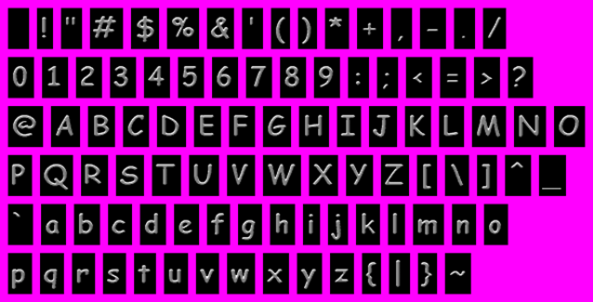
这张图片必须包含一个alpha通道, 洋红色的地方不透明, 字体黑色背景透明.
添加该资源文件是的属性面板设置, 使用FontTextureProcessor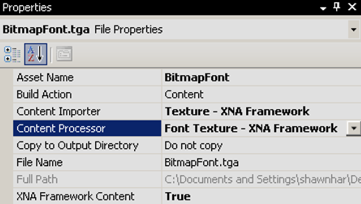
1 | public class FontTextureProcessor : ContentProcessor<Texture2DContent, SpriteFontContent> |
ExtractGlyphs被Process调用, 返回一个SpriteFontContent. 如此, 仍就可以使用上面的SpriteFont类, Content Pipeline消除了*.spritefont和bitmapfont之间的差异.
详细可以参考https://blogs.msdn.microsoft.com/shawnhar/2007/04/26/bitmap-fonts-in-xna/