上一篇介绍了WCF的基本概念, 这一篇介绍WCF的基本使用方法.
Every service is associated with an address(地址) that defines where the service is, a binding(绑定) that defines how to communicate with the service, and a contract(契约) that defines what the service does.
简称ABC三要素, 这三个要素合起来叫做Endpoint.
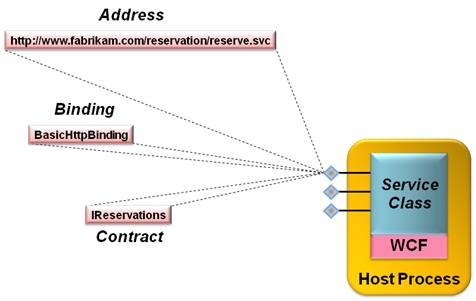
Address
WCF支持多种不同的传输协议, sample address如下:
- http://localhost:8001/MyService
- net.tcp://localhost:8002/MyService
- net.pipe://localhost/MyPipe
- net.msmq://localhost/MyQueue
- ws://localhost/MyService
- soap.udp://localhost:8081/MyService
Binding
对传输协议, 消息编码, 通信模式, 可靠性, 安全性, 事务等等的配置则是放在binding中, WCF提供了诸如NetTcpBinding, NetNamedPipeBinding, WSHttpBinding等常用的binding
Contract
WCF中定义了4类Contract.最常用的2类是Service contracts和Data contracts. 其中Data contracts表示在调用服务操作时传递的数据, 例如参数和返回值.在Service contracts内部, 还需要在方法上添加OperationContract, 表示该Service公开的操作.
Service的实现类可以支持多个Service接口, 例如1
2
3
4
5
6
7
8
9
10
11
12
13
14
15
16
17
18
19
20
21[]
interface IMyContract
{
[]
string MyMethod();
}
[]
interface IMyOtherContract
{
[]
void MyOtherMethod();
}
class MyService : IMyContract,IMyOtherContract
{
public string MyMethod()
{...}
public void MyOtherMethod()
{...}
}
Logically, the endpoint is the service’s interface and is analogous to a CLR or COM interface
所以这里MyService至少暴露了2个Endpoint.
Every service must expose at least one business endpoint, and each endpoint has
exactly one contract. All endpoints on a service have unique addresses, and a single
service can expose multiple endpoints. These endpoints can use the same or different
bindings and can expose the same or different contracts. There is absolutely no relationship between the various endpoints a service provides.
Endpoint可以设置在配置文件中1
2
3
4
5
6
7
8
9
10
11
12
13
14
15
16
17<service name = "MyService">
<endpoint
address = "http://localhost:8000/MyService"
binding = "wsHttpBinding"
contract = "IMyContract"
/>
<endpoint
address = "net.tcp://localhost:8001/MyService"
binding = "netTcpBinding"
contract = "IMyContract"
/>
<endpoint
address = "net.tcp://localhost:8002/MyService"
binding = "netTcpBinding"
contract = "IMyOtherContract"
/>
</service>
也可以用代码的方式设置1
2
3
4
5
6
7
8
9
10
11// Example 1-9. Service-side programmatic endpoint confguration
ServiceHost host = new ServiceHost(typeof(MyService));
Binding wsBinding = new WSHttpBinding();
Binding tcpBinding = new NetTcpBinding();
host.AddServiceEndpoint(typeof(IMyContract),wsBinding,
"http://localhost:8000/MyService");
host.AddServiceEndpoint(typeof(IMyContract),tcpBinding,
"net.tcp://localhost:8001/MyService");
host.AddServiceEndpoint(typeof(IMyOtherContract),tcpBinding,
"net.tcp://localhost:8002/MyService");
host.Open();
Service这边设置好了Endpoint, 下一步就是公开元数据了. 一种比较简单的方式是HTTP-GET, 可以在Endpoint配置文件中指定. 然后, 启动Service进程, 打开浏览器, 输入网址, 得到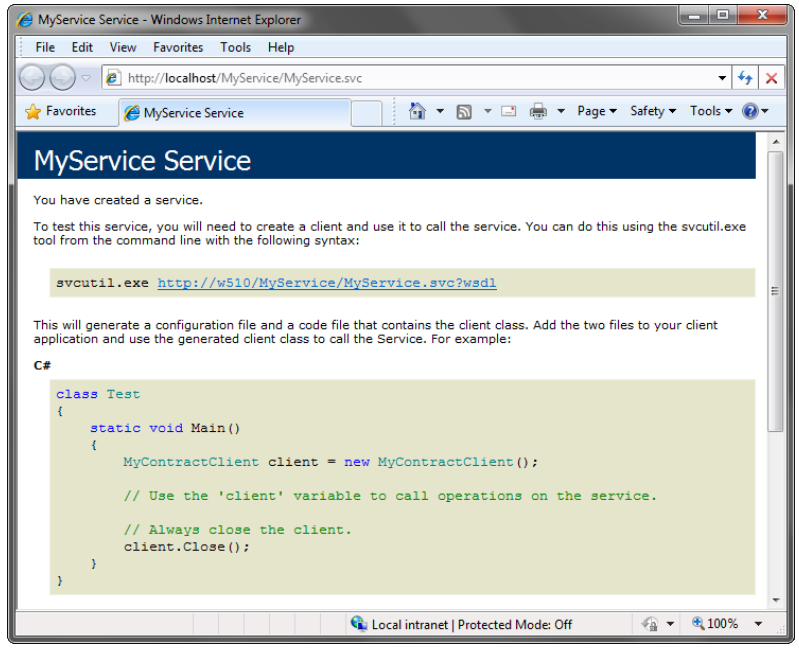
图上写明了如何使用工具生成Service在本地环境中的Proxy, 和使用Proxy的方式. Proxy对应的是Service Class的其中一个Endpoint
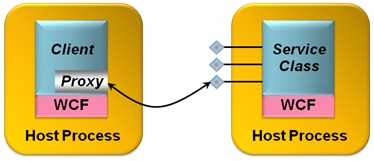
除了SvcUtil.exe工具, 还可以用Visual Studio生成Proxy, 详见Programming WCF Service 4th P60
Client这边使用Proxy, 也需要配置文件, 或者直接在程序中配置1
2
3
4
5
6
7
8WSHttpBinding wsBinding = new WSHttpBinding();
wsBinding.SendTimeout = TimeSpan.FromMinutes(5);
wsBinding.TransactionFlow = true;
EndpointAddress endpointAddress = new EndpointAddress("http://localhost:8000/MyService");
MyContractClient proxy = new MyContractClient(wsBinding,endpointAddress);
proxy.MyMethod();
proxy.Close();
以上就是WCF的基本使用方式, 官方有一个Tutorial(https://docs.microsoft.com/en-us/dotnet/framework/wcf/getting-started-tutorial)指导一步一步怎么做.
另外也可以不生成Proxy, 直接使用Channel进行Service的调用, 这样更加方便.1
2
3
4
5
6
7Binding binding = new NetTcpBinding();
EndpointAddress address = new EndpointAddress("net.tcp://localhost:8000");
IMyContract proxy = ChannelFactory<IMyContract>.CreateChannel(binding,address);
using(proxy as IDisposable)
{
proxy.MyMethod();
}
Using proxies is simple, and it’s the right approach in many situations. It’s not the only choice, however. Beneath the veneer a proxy provides, the client’s communication with a service is handled by one or more channels. If desired, a client can work directly with these channels (as can a service). Using WCF’s ChannelFactory class, the developer can create whatever channels are required, then invoke their services directly. Doing this gives the developer more control, but also introduces somewhat more complexity.