远


  • Home

  • About

  • Tags

  • Categories

  • Archives

P&P笔记(X1) Exception Handle (二)

Posted on 2018-04-22 | In 编程

这一篇主要整理try catch的一些使用细节.

try catch finally 和 return

return在try catch finally中的位置

1
2
3
4
5
6
7
8
9
10
11
12
13
14
15
16
17
18
19
20
21
22
23
24
25
26
27
28
29
30
31
可以这样
public bool SomeFunction()
{
try
{
//somecode
return true;
}
catch(Exception ex)
{
MessageBox.Show(ex.message);
return false;
}
}

或者
public bool SomeFunction()
{
bool success = true;
try
{
//somecode
}
catch(Exception ex)
{
MessageBox.Show(ex.message);
success = false;
}

return success;
}

finally中的逻辑会在return之前执行. finally中不能含有return.

using关键字

对于那些封装了非托管资源的类, 建议使用using关键字

1
2
3
4
5
6
7
8
9
10
11
12
13
14
15
16
17
18
using (Font font1 = new Font("Arial", 10.0f)) 
{
byte charset = font1.GdiCharSet;
}

等价于
{
Font font1 = new Font("Arial", 10.0f);
try
{
byte charset = font1.GdiCharSet;
}
finally
{
if (font1 != null)
((IDisposable)font1).Dispose();
}
}

using没有catch语句, 所以使用下列方式

1
2
3
4
5
6
7
8
9
10
11
try
{
using (var myObject = new MyClass())
{
// something here...
}
}
catch(Exception ex)
{
// Handle exception
}

当然不用using也可以, 例如

1
2
3
4
5
6
7
8
9
10
11
12
13
14
15
16
17
18
19
20
21
22
23
24
25
26
27
28
29
30
31
32
static void Deserialize() 
{
// Declare the hashtable reference.
Hashtable addresses = null;

// Open the file containing the data that you want to deserialize.
FileStream fs = new FileStream("DataFile.dat", FileMode.Open);
try
{
BinaryFormatter formatter = new BinaryFormatter();

// Deserialize the hashtable from the file and
// assign the reference to the local variable.
addresses = (Hashtable) formatter.Deserialize(fs);
}
catch (SerializationException e)
{
Console.WriteLine("Failed to deserialize. Reason: " + e.Message);
throw;
}
finally
{
fs.Close();
}

// To prove that the table deserialized correctly,
// display the key/value pairs.
foreach (DictionaryEntry de in addresses)
{
Console.WriteLine("{0} lives at {1}.", de.Key, de.Value);
}
}

多线程中的异常处理

Thread中的异常处理

http://www.albahari.com/threading/#_Exception_Handling 中有如下示例程序

1
2
3
4
5
6
7
8
9
10
11
12
13
14
public static void Main()
{
try
{
new Thread (Go).Start();
}
catch (Exception ex)
{
// We'll never get here!
Console.WriteLine ("Exception!");
}
}

static void Go() { throw null; } // Throws a NullReferenceException

这种情况, NullReferenceException是不会进入catch语句块的. 正确的做法是在方法Go内部进行try/catch:

1
2
3
4
5
6
7
8
9
10
11
12
13
14
15
16
17
18
19
20
public static void Main()
{
new Thread (Go).Start();
}

static void Go()
{
try
{
// ...
throw null; // The NullReferenceException will get caught below
// ...
}
catch (Exception ex)
{
// Typically log the exception, and/or signal another thread
// that we've come unstuck
// ...
}
}

为了防止应用程序崩溃, 链接中给出的建议是在所有线程的入口方法都加上try/catch

You need an exception handler on all thread entry methods in production applications — just as you do (usually at a higher level, in the execution stack) on your main thread. An unhandled exception causes the whole application to shut down. With an ugly dialog!

Task中的异常处理

Task中有两种处理方式, 第一种和前面Thread的处理方式一样, 例如:

1
Task.Run (() => { try { ... } catch (Exception ex) { ... } });

另一种是在Run的外面捕获, 例如:

1
2
3
4
5
6
7
8
9
10
11
12
13
// Start a Task that throws a NullReferenceException:
Task task = Task.Run (() => { throw null; });
try
{
task.Wait();
}
catch (AggregateException aex)
{
if (aex.InnerException is NullReferenceException)
Console.WriteLine ("Null!");
else
throw;
}

与Thread不一样的是, Task能够propagate exception, C# in a nutshell中提到

Unlike with threads, tasks conveniently propagate exceptions. So, if the code in your task throws an unhandled exception (in other words, if your task faults), that exception is automatically rethrown to whoever calls Wait()—or accesses the Result property of a Task

需要注意的是task.Wait()和访问task.Result都是block Thread的. 使用AggregateException是为了和task parallel programming兼容

对于task中没有捕获的异常(unobserved exception), 还可以使用TaskScheduler.UnobservedTaskException事件进行监听, 例如:

1
2
3
4
5
6
7
8
9
10
11
12
13
14
//https://code.msdn.microsoft.com/windowsdesktop/Handling-Unhandled-47492d0b
private void TaskException_Click(object sender, RoutedEventArgs e)
{
Task t = Task.Factory.StartNew(() =>
{
throw new Exception("Task Exception!!", MyInnerException);
});

((IAsyncResult)t).AsyncWaitHandle.WaitOne();
t = null;
GC.Collect();
GC.WaitForPendingFinalizers();
GC.Collect();
}

1
2
3
4
5
6
7
8
9
10
11
public App()
{
TaskScheduler.UnobservedTaskException += TaskScheduler_UnobservedTaskException;
}

void TaskScheduler_UnobservedTaskException(object sender, UnobservedTaskExceptionEventArgs e)
{
MessageBox.Show("4. TaskScheduler_UnobservedTaskException");
log.ProcessError(e.Exception);
e.SetObserved();
}

async中的异常处理

async中异常处理也很简单, 示例摘自Async in C# 5.0

1
2
3
4
5
6
7
8
9
10
11
12
13
14
15
16
17
async Task Catcher()
{
try
{
await Thrower();
}
catch (AlexsException)
{
// Execution will reach here
}
}

async Task Thrower()
{
await Task.Delay(100);
throw new AlexsException();
}
P&P笔记(X1) Exception Handle (一)

Posted on 2018-04-22 | In 编程

这一篇主要整理Exception的机制.

什么是Exception以及Exception Handle

回答这个问题, 下面这段讲Exception与Assert区别的文字, 从另一个角度解释了什么是异常. 有醍醐灌顶, 正本清源的感觉.

Exception与Assert的区别

链接https://docs.microsoft.com/en-us/cpp/cpp/errors-and-exception-handling-modern-cpp

Exceptions and asserts are two distinct mechanisms for detecting run-time errors in a program. Use asserts to test for conditions during development that should never be true if all your code is correct. There is no point in handling such an error by using an exception because the error indicates that something in the code has to be fixed(是代码本身出了问题), and doesn’t represent a condition that the program has to recover from at run time. An assert stops execution at the statement so that you can inspect the program state in the debugger; an exception continues execution from the first appropriate catch handler. Use exceptions to check error conditions that might occur at run time even if your code is correct, for example, “file not found” or “out of memory.” You might want to recover from these conditions, even if the recovery just outputs a message to a log and ends the program. Always check arguments to public functions by using exceptions. Even if your function is error-free, you might not have complete control over arguments that a user might pass to it.

再看C# in a nutshell中怎么说

An assertion is something that, if violated, indicates a bug in the current method’s code.
Throwing an exception based on argument validation indicates a bug in the caller’s code.

例如一个复杂的算法内部在进行下一个计算时, 上一个计算得到的值必须符合某个范围. 如果在范围外, 则表示该算法的计算步骤有误, 这种情况下, 使用的是断言. 断言判断的是程序本身的逻辑问题.异常, 就像链接中所说的那样, 程序本身没有问题. 是运行时的问题, 例如输入, 网络异常, 读写异常等等. 有些异常可以恢复, 例如FileNotFoundException; 有些异常不能恢复, 例如StackOverflowException. 异常处理的做法是, 对于可恢复的异常, 根据程序上下文, 恢复程序的正常执行; 对于那些不可恢复的异常, 则记录日志, 再次抛出异常, 终止程序执行.

throw还是不throw

对于函数设计而言, 什么情况下需要抛出异常, 什么情况下不抛出异常, 可以用if来替代.

一种说法是尽量少throw, 例如

Best Practices - Exception Handling in C# .NET
https://www.c-sharpcorner.com/UploadFile/84c85b/best-practices-exception-handling-in-C-Sharp-net/
中提到2点

  1. Do Not Throw Exceptions to Control Application Flow
  2. Use Validation Code to Reduce Unnecessary Exceptions

像除以0这种, 用if判断即可, 不要throw exception.

另一种说法是Always check arguments to public functions by using exceptions
看List的源码发现很多throw exception
https://referencesource.microsoft.com/#mscorlib/system/collections/generic/list.cs,cf7f4095e4de7646

1
2
3
4
5
6
7
8
9
10
11
12
13
14
15
16
17
18
19
20
21
 public List(int capacity) {
if (capacity < 0) ThrowHelper.ThrowArgumentOutOfRangeException(ExceptionArgument.capacity, ExceptionResource.ArgumentOutOfRange_NeedNonNegNum);

public List(IEnumerable<T> collection) {
if (collection == null)
ThrowHelper.ThrowArgumentNullException(ExceptionArgument.collection);

public List<T> FindAll(Predicate<T> match) {
if( match == null) {
ThrowHelper.ThrowArgumentNullException(ExceptionArgument.match);
}
Contract.EndContractBlock();

List<T> list = new List<T>();
for(int i = 0 ; i < _size; i++) {
if(match(_items[i])) {
list.Add(_items[i]);
}
}
return list;
}

该如何选择?

其实仔细看一下上述List的方法, 可以发现一些线索.像构造方法这种, 如果输入参数有误, 是没有办法通过if来规避的, 只能抛出异常; 再看FindAll方法, API的设计是需要返回一个列表. 假如match为null时不抛出异常, 那么是return null还是return new list()呢? return new List的话, 即使match不是null, 也有可能返回. 即所有的item都不匹配. return null的话, 从API的设计角度, 是不恰当的. 调用者调用List的FindAll方法, 不应该返回null. 当不知道返回什么时, throw exception是一个更好的选择, throw new exception可以当做返回值, 编译器不会报错. 而且List属于底层库. 它没有程序上下文, 也不需要去recover. 直接像上层抛出异常即可.

再例如:

1
2
3
4
5
6
7
public List<People> GetAllCustomersByAge(int age)
{
if (age < 18 || age > 150)
{
throw new ArgumentOutOfRangeException("Age must be between 18 and 150.", nameof(age));
}
}

虽然这是上层逻辑, 但该方法内部缺少恢复的程序上下文, 抛出异常是合适的.

现在再来讨论可以不抛出异常的情况.
https://github.com/dotnet/training-tutorials/blob/master/content/csharp/getting-started/exceptions.md
该链接中有这样一段文字和示例:

When to Avoid Throwing and Catching

It is important that you only throw exceptions when it’s appropriate, when your code is in an unintended(没预料到的) situation. If the situation seems likely(预料到的), but requires taking a certain action, just handle it using normal application flow control elements like if statements.

A rule of thumb for determining if you need to throw an exception is if you encounter a situation in a method that doesn’t allow you to return a valid result. In that case, an exception may be the best solution, or you may need to reconsider what your method is returning. The following two examples demonstrate two ways to deal with a method failing to perform its intended task:

1
2
3
4
5
6
7
8
9
public void SetMemberBirthday(int memberId, DateTime birthday)
{
Member member = _memberList.SingleOrDefault(m => m.Id == memberId);
if (member == null)
{
throw new MemberNotFoundException(id);
}
member.Birthday = birthday;
}

没有找到member是一种预料之中的情况, 这种情况下, 可以更改API的设计, 来避免抛出异常

1
2
3
4
5
6
7
8
9
10
11
public bool SetMemberBirthday(int memberId, DateTime birthday)
{
Member member = _memberList.SingleOrDefault(m => m.Id == memberId);
if (member == null)
{
Logger.LogWarning($"SetMemberBirthday Error: Member {memberId} not found. Birthday not set {birthday}.");
return false; // false tells the caller that the operation failed.
}
member.Birthday = birthday;
return true;
}

通过以上的描述, 可以体会下面的结论:

  1. 异常用在unintended situation中. 什么样算是unintended, 这需要程序员自己界定. 这是一个难点.
  2. 如果是intended situation, 可以通过更改API的接口设计(返回值)来避免抛出异常.
  3. 像List的FindAll方法, 它的接口意图是明确的. 它的返回值没法更改. 这种不知道返回什么的情况下, 用
    throw exception是最合适的选择.

上面提到的是API的设计, 更上一层, 在类的设计层面去避免异常. 下面摘自Best practices for exceptions
https://docs.microsoft.com/en-us/dotnet/standard/exceptions/best-practices-for-exceptions

Handle common conditions without throwing exceptions

For conditions that are likely to occur but might trigger an exception, consider handling them in a way that will avoid the exception. For example, if you try to close a connection that is already closed, you’ll get an InvalidOperationException. You can avoid that by using an if statement to check the connection state before trying to close it.

1
2
3
4
if (conn.State != ConnectionState.Closed)
{
conn.Close();
}

conn类提供了State属性, 用来判断; 如果没有改属性, 则需要捕获异常

1
2
3
4
5
6
7
8
9
try
{
conn.Close();
}
catch (InvalidOperationException ex)
{
Console.WriteLine(ex.GetType().FullName);
Console.WriteLine(ex.Message);
}

The method to choose depends on how often you expect the event to occur.

  • Use exception handling if the event doesn’t occur very often, that is, if the event is truly exceptional and indicates an error (such as an unexpected end-of-file). When you use exception handling, less code is executed in normal conditions.

  • Check for error conditions in code if the event happens routinely and could be considered part of normal execution. When you check for common error conditions, less code is executed because you avoid exceptions.

Design classes so that exceptions can be avoided. A class can provide methods or properties that enable you to avoid making a call that would trigger an exception. For example, a FileStream class provides methods that help determine whether the end of the file has been reached. These can be used to avoid the exception that is thrown if you read past the end of the file.

swallow还是rethrow

对于下层调用抛出的异常, 是吞掉呢? 还是向上propagate. 这个主要看当前这一层, 有没有足够的程序上下文, 来进行恢复. 如果没有那样的能力, 只能rethrow exception. 下面这段文字摘自MSDN, 讲的非常明了.

https://docs.microsoft.com/en-us/cpp/cpp/how-to-design-for-exception-safety

Basic Techniques
A robust exception-handling policy requires careful thought and should be part of the design process. In general, most exceptions are detected and thrown at the lower layers of a software module, but typically these layers do not have enough context to handle the error or expose a message to end users. In the middle layers, functions can catch and rethrow an exception when they have to inspect the exception object, or they have additional useful information to provide for the upper layer that ultimately catches the exception. A function should catch and “swallow” an exception only if it is able to completely recover from it. In many cases, the correct behavior in the middle layers is to let an exception propagate up the call stack. Even at the highest layer, it might be appropriate to let an unhandled exception terminate a program if the exception leaves the program in a state in which its correctness cannot be guaranteed.
No matter how a function handles an exception, to help guarantee that it is “exception-safe,” it must be designed according to the following basic rules.

DesignPattern笔记(三)Iterator

Posted on 2018-01-08 | In 编程

https://en.wikipedia.org/wiki/Iterator_pattern


参考C#中的IEnumerable和IEnumerator接口, 以string为例(代码摘自C# 5.0 in a nutshell第4章和第7章相关章节)

1
2
3
4
5
6
7
8
9
string s = "Hello";
// Because string implements IEnumerable, we can call GetEnumerator():
IEnumerator rator = s.GetEnumerator();
while (rator.MoveNext())
{
char c = (char) rator.Current;
Console.Write (c + ".");
}
// Output: H.e.l.l.o.

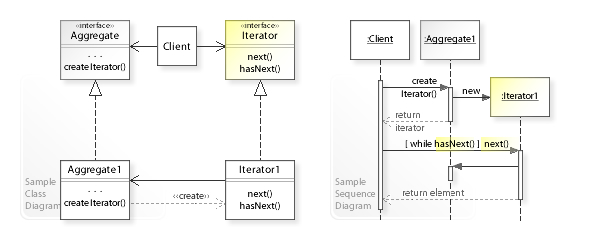
IEnumerable接口等同于Aggregate接口
IEnumerator接口等同于Iterator接口

1
2
3
4
5
6
7
8
9
10
11
public interface IEnumerable
{
IEnumerator GetEnumerator();
}

public interface IEnumerator
{
bool MoveNext();
object Current { get; }
void Reset();
}

GetEnumerator方法等同于CreateInterator方法
string实现IEnumerable接口. CharEnumerator实现IEnumerator, IEnumerator接口(http://referencesource.microsoft.com/#mscorlib/system/charenumerator.cs,a6b81e2669b87db5)

这是C# 1.0. 之后用法上引入了foreach, 实现上引入了yield return.

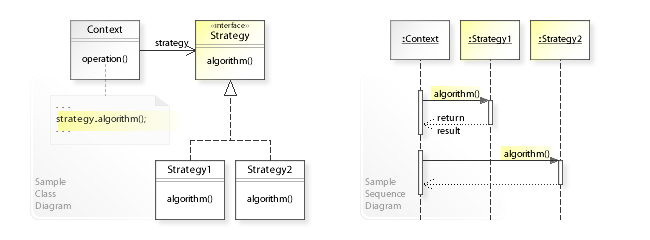
DesignPattern笔记(二)Strategy

Posted on 2018-01-05 | In 编程

https://en.wikipedia.org/wiki/Strategy_pattern


参考C#中的IComparer 接口, 此接口用于 List.Sort 和 List.BinarySearch 方法(https://msdn.microsoft.com/zh-cn/library/8ehhxeaf(v=vs.110).aspx)

1
2
3
4
5
6
7
8
public void Sort(
IComparer<T> comparer
)

public int BinarySearch(
T item,
IComparer<T> comparer
)

IComparer<T>就扮演了Strategy接口的角色, Context则是List<T>

下面是官方示例代码(https://msdn.microsoft.com/en-us/library/234b841s(v=vs.110).aspx):

1
2
3
4
5
6
7
8
9
10
11
12
13
14
15
16
17
18
19
20
21
22
23
24
25
26
27
28
29
30
31
32
33
34
35
36
37
38
39
40
41
42
43
44
45
46
47
48
49
50
51
52
53
54
55
56
57
58
59
60
61
62
63
64
65
66
67
68
69
70
71
72
73
74
75
76
77
78
79
80
81
82
83
84
85
86
87
88
89
90
91
92
93
94
95
96
97
98
99
100
101
102
103
104
105
106
107
108
109
110
111
112
113
114
115
116
117
118
119
120
121
122
123
124
125
126
127
128
129
130
131
132
133
134
135
136
137
138
139
140
141
142
143
144
145
146
147
148
149
150
151
152
153
154
155
156
157
158
159
160
161
162
using System;
using System.Collections.Generic;

public class DinoComparer: IComparer<string>
{
public int Compare(string x, string y)
{
if (x == null)
{
if (y == null)
{
// If x is null and y is null, they're
// equal.
return 0;
}
else
{
// If x is null and y is not null, y
// is greater.
return -1;
}
}
else
{
// If x is not null...
//
if (y == null)
// ...and y is null, x is greater.
{
return 1;
}
else
{
// ...and y is not null, compare the
// lengths of the two strings.
//
int retval = x.Length.CompareTo(y.Length);

if (retval != 0)
{
// If the strings are not of equal length,
// the longer string is greater.
//
return retval;
}
else
{
// If the strings are of equal length,
// sort them with ordinary string comparison.
//
return x.CompareTo(y);
}
}
}
}
}

public class Example
{
public static void Main()
{
List<string> dinosaurs = new List<string>();
dinosaurs.Add("Pachycephalosaurus");
dinosaurs.Add("Amargasaurus");
dinosaurs.Add("Mamenchisaurus");
dinosaurs.Add("Deinonychus");
Display(dinosaurs);

DinoComparer dc = new DinoComparer();

Console.WriteLine("\nSort with alternate comparer:");
dinosaurs.Sort(dc);
Display(dinosaurs);

SearchAndInsert(dinosaurs, "Coelophysis", dc);
Display(dinosaurs);

SearchAndInsert(dinosaurs, "Oviraptor", dc);
Display(dinosaurs);

SearchAndInsert(dinosaurs, "Tyrannosaur", dc);
Display(dinosaurs);

SearchAndInsert(dinosaurs, null, dc);
Display(dinosaurs);
}

private static void SearchAndInsert(List<string> list,
string insert, DinoComparer dc)
{
Console.WriteLine("\nBinarySearch and Insert \"{0}\":", insert);

int index = list.BinarySearch(insert, dc);

if (index < 0)
{
list.Insert(~index, insert);
}
}

private static void Display(List<string> list)
{
Console.WriteLine();
foreach( string s in list )
{
Console.WriteLine(s);
}
}
}

/* This code example produces the following output:

Pachycephalosaurus
Amargasaurus
Mamenchisaurus
Deinonychus

Sort with alternate comparer:

Deinonychus
Amargasaurus
Mamenchisaurus
Pachycephalosaurus

BinarySearch and Insert "Coelophysis":

Coelophysis
Deinonychus
Amargasaurus
Mamenchisaurus
Pachycephalosaurus

BinarySearch and Insert "Oviraptor":

Oviraptor
Coelophysis
Deinonychus
Amargasaurus
Mamenchisaurus
Pachycephalosaurus

BinarySearch and Insert "Tyrannosaur":

Oviraptor
Coelophysis
Deinonychus
Tyrannosaur
Amargasaurus
Mamenchisaurus
Pachycephalosaurus

BinarySearch and Insert "":


Oviraptor
Coelophysis
Deinonychus
Tyrannosaur
Amargasaurus
Mamenchisaurus
Pachycephalosaurus
*/

另外在数值求解库的设计中也会遇到策略模式, 例如线性方程组的求解有多种方法.

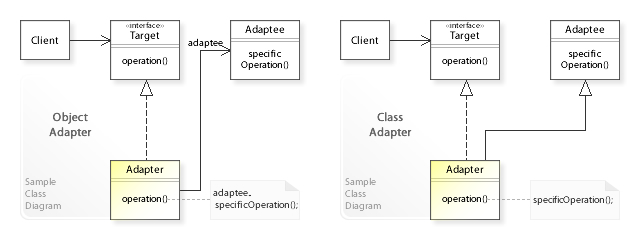
DesignPattern笔记(一)Adapter

Posted on 2018-01-04 | In 编程

https://en.wikipedia.org/wiki/Adapter_pattern


Client使用的是接口. 参考JDK中的LinkedList(https://docs.oracle.com/javase/7/docs/api/java/util/LinkedList.html). LinkedList类实现了java.util.Queue接口, 使用offer和poll入队出队

1
2
3
4
5
6
7
8
9
10
11
12
13
14
15
16
17
import java.util.Queue;
import java.util.LinkedList;

public class TestQueue {
public static void main(String[] args) {
Queue<String> queue = new LinkedList<String>();
queue.offer("Hello");
queue.offer("World!");
System.out.println(queue.size());
String str;
while((str=queue.poll())!=null){
System.out.print(str);
}
System.out.println();
System.out.println(queue.size());
}
}

LinkedList另外实现了其他接口Deque<E>, List<E>等.
Java是单继承, 可以认为是用其他接口的方法实现Queue接口, 也属于Class Adapter.

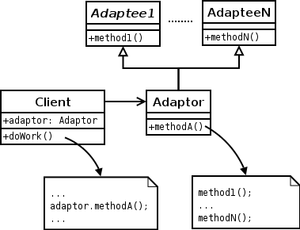
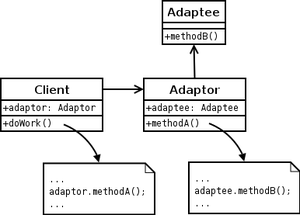
wiki中另外两幅图


Client直接使用Adapter类. 参考JDK中的MouseAdapter(https://docs.oracle.com/javase/7/docs/api/java/awt/event/MouseAdapter.html)

1
2
public abstract class MouseAdapter extends Object
implements MouseListener, MouseWheelListener, MouseMotionListener

使用方式如下(http://www.yiibai.com/swing/swing_mouseadapter.html)

1
2
3
4
5
6
7
8
9
10
JLabel msglabel 
= new JLabel("Welcome to TutorialsPoint SWING Tutorial."
,JLabel.CENTER);

msglabel.addMouseListener(new MouseAdapter(){
public void mouseClicked(MouseEvent e) {
statusLabel.setText("Mouse Clicked: ("
+e.getX()+", "+e.getY() +")");
}
});

MouseAdapter有方法体, 但里面为空. 如果单独实现MouseListener, MouseWheelListener等接口, 那么必须实现所有的方法. 有了MouseAdapter, 在子类中就可以只关心那些需要的事件处理方法.

MonoGame笔记(X6)Game State Management (三)

Posted on 2017-12-25 | In 编程

上一篇笔记中介绍了主菜单进入游戏再到退出游戏的大致流程. 接下来看一下ScreenManager的Update方法和Draw方法
Draw方法比较简单, 如果是Hidden状态, 则不绘制. Update方法复杂一点,它是用List当做Stack, 也是自顶向下更新. 而Draw如上一篇笔记所说, 是自底向上绘制.

Update方法中的两个变量: otherScreenHasFocus, coveredByOtherScreen比较关键. 并且这两个变量会传递给GameScreen的Update方法.

1
2
3
4
5
6
7
8
9
10
11
12
13
14
15
16
17
18
19
20
21
22
23
24
25
26
27
28
29
30
31
32
33
34
35
36
37
38
39
40
41
42
43
44
45
46
47
48
49
50
51
52
53
54
55
56
57
58
59
60
61
62
63
64
65
66
/// <summary>
/// Allows each screen to run logic.
/// </summary>
public override void Update(GameTime gameTime)
{
// Read the keyboard and gamepad.
input.Update();

// Make a copy of the master screen list, to avoid confusion if
// the process of updating one screen adds or removes others.
screensToUpdate.Clear();

foreach (GameScreen screen in screens)
screensToUpdate.Add(screen);

bool otherScreenHasFocus = !Game.IsActive;
bool coveredByOtherScreen = false;

// Loop as long as there are screens waiting to be updated.
while (screensToUpdate.Count > 0)
{
// Pop the topmost screen off the waiting list.
GameScreen screen = screensToUpdate[screensToUpdate.Count - 1];

screensToUpdate.RemoveAt(screensToUpdate.Count - 1);

// Update the screen.
screen.Update(gameTime, otherScreenHasFocus, coveredByOtherScreen);

if (screen.ScreenState == ScreenState.TransitionOn ||
screen.ScreenState == ScreenState.Active)
{
// If this is the first active screen we came across,
// give it a chance to handle input.
if (!otherScreenHasFocus)
{
screen.HandleInput(input);

otherScreenHasFocus = true;
}

// If this is an active non-popup, inform any subsequent
// screens that they are covered by it.
if (!screen.IsPopup)
coveredByOtherScreen = true;
}
}

// Print debug trace?
if (traceEnabled)
TraceScreens();
}

/// <summary>
/// Tells each screen to draw itself.
/// </summary>
public override void Draw(GameTime gameTime)
{
foreach (GameScreen screen in screens)
{
if (screen.ScreenState == ScreenState.Hidden)
continue;

screen.Draw(gameTime);
}
}

otherScreenHasFocus用来控制输入焦点;只有最顶上的那个GameScreen可以接收输入, 之后的GameScreen都不能接收输入.

coveredByOtherScreen用来控制是否绘制该GameScreen. 例如游戏画面被主菜单盖住, GamePlayScreen就不需要再被绘制. 前提是盖住的那个GameScreen不是Popup弹窗. MessageBoxScreen属于Popup弹窗.

GameScreen的Update方法对coveredByOtherScreen进行判断. 如果为真, 该GameScreen就需要淡出, 直至完全隐藏.
淡出时仍旧需要绘制.

1
2
3
4
5
6
7
8
9
10
11
12
13
14
15
16
17
18
19
20
21
22
23
24
25
26
27
28
29
30
31
32
33
34
35
36
37
38
39
40
41
42
43
44
45
46
47
48
49
50
/// <summary>
/// Allows the screen to run logic, such as updating the transition position.
/// Unlike HandleInput, this method is called regardless of whether the screen
/// is active, hidden, or in the middle of a transition.
/// </summary>
public virtual void Update(GameTime gameTime, bool otherScreenHasFocus,
bool coveredByOtherScreen)
{
this.otherScreenHasFocus = otherScreenHasFocus;

if (isExiting)
{
// If the screen is going away to die, it should transition off.
screenState = ScreenState.TransitionOff;

if (!UpdateTransition(gameTime, transitionOffTime, 1))
{
// When the transition finishes, remove the screen.
ScreenManager.RemoveScreen(this);
}
}
else if (coveredByOtherScreen)
{
// If the screen is covered by another, it should transition off.
if (UpdateTransition(gameTime, transitionOffTime, 1))
{
// Still busy transitioning.
screenState = ScreenState.TransitionOff;
}
else
{
// Transition finished!
screenState = ScreenState.Hidden;
}
}
else
{
// Otherwise the screen should transition on and become active.
if (UpdateTransition(gameTime, transitionOnTime, -1))
{
// Still busy transitioning.
screenState = ScreenState.TransitionOn;
}
else
{
// Transition finished!
screenState = ScreenState.Active;
}
}
}

这种做法还是很巧妙的. 顶上GameScreen借助这种方式”通知”下面的GameScreen. 而且, 顶上的GameScreen如果是TransitionOn淡入, 底下的GameScreen就得到TransitionOff淡出的”通知”, 两者一前一后几乎同时发生, 视觉效果不错.

接下来看看MenuScreen与MenuEntry的关系.

1
2
3
4
5
6
7
8
9
10
11
12
13
14
15
16
/// <summary>
/// Updates the menu.
/// </summary>
public override void Update(GameTime gameTime, bool otherScreenHasFocus,
bool coveredByOtherScreen)
{
base.Update(gameTime, otherScreenHasFocus, coveredByOtherScreen);

// Update each nested MenuEntry object.
for (int i = 0; i < menuEntries.Count; i++)
{
bool isSelected = IsActive && (i == selectedEntry);

menuEntries[i].Update(this, isSelected, gameTime);
}
}

MenuEntry有自己的Update和Draw方法. MenuEntry自己控制Selected与Unselected时的状态效果. MenuEntry还暴露了一个Selected事件, 供MenuScreen监听. 但MenuEntry是否被选中, 是在MenuScreen的HandleInput中进行判断. 不是在MenuEntry内部. selectedEntry是由MenuScreen控制的, 具体有多少个Entry只有MenuScreen知晓

方向键移动, Enter键选择

1
2
3
4
5
6
7
8
9
10
11
12
13
14
15
16
17
18
19
20
21
22
23
24
25
26
27
28
29
30
31
32
33
34
35
36
37
38
39
40
41
42
43
44
45
46
47
48
/// <summary>
/// Responds to user input, changing the selected entry and accepting
/// or cancelling the menu.
/// </summary>
public override void HandleInput(InputState input)
{
// Move to the previous menu entry?
if (input.IsMenuUp(ControllingPlayer))
{
selectedEntry--;

if (selectedEntry < 0)
selectedEntry = menuEntries.Count - 1;
}

// Move to the next menu entry?
if (input.IsMenuDown(ControllingPlayer))
{
selectedEntry++;

if (selectedEntry >= menuEntries.Count)
selectedEntry = 0;
}

// Accept or cancel the menu? We pass in our ControllingPlayer, which may
// either be null (to accept input from any player) or a specific index.
// If we pass a null controlling player, the InputState helper returns to
// us which player actually provided the input. We pass that through to
// OnSelectEntry and OnCancel, so they can tell which player triggered them.
PlayerIndex playerIndex;

if (input.IsMenuSelect(ControllingPlayer, out playerIndex))
{
OnSelectEntry(selectedEntry, playerIndex);
}
else if (input.IsMenuCancel(ControllingPlayer, out playerIndex))
{
OnCancel(playerIndex);
}
}

/// <summary>
/// Handler for when the user has chosen a menu entry.
/// </summary>
protected virtual void OnSelectEntry(int entryIndex, PlayerIndex playerIndex)
{
menuEntries[entryIndex].OnSelectEntry(playerIndex);
}

MenuEntry

1
2
3
4
5
6
7
8
/// <summary>
/// Method for raising the Selected event.
/// </summary>
protected internal virtual void OnSelectEntry(PlayerIndex playerIndex)
{
if (Selected != null)
Selected(this, new PlayerIndexEventArgs(playerIndex));
}

其他

BackgroundScreen的LoadContent

1
2
3
4
5
6
7
8
9
10
11
12
13
14
15
16
17
18
19
20
21
22
23
24
25
26
27
/// <summary>
/// Loads graphics content for this screen. The background texture is quite
/// big, so we use our own local ContentManager to load it. This allows us
/// to unload before going from the menus into the game itself, wheras if we
/// used the shared ContentManager provided by the Game class, the content
/// would remain loaded forever.
/// </summary>
public override void LoadContent()
{
if (content == null)
content = new ContentManager(ScreenManager.Game.Services, "Content");

backgroundTexture = content.Load<Texture2D>("background");
}

/// <summary>
/// Updates the background screen. Unlike most screens, this should not
/// transition off even if it has been covered by another screen: it is
/// supposed to be covered, after all! This overload forces the
/// coveredByOtherScreen parameter to false in order to stop the base
/// Update method wanting to transition off.
/// </summary>
public override void Update(GameTime gameTime, bool otherScreenHasFocus,
bool coveredByOtherScreen)
{
base.Update(gameTime, otherScreenHasFocus, false);
}

MonoGame笔记(X5)Game State Management (二)

Posted on 2017-12-25 | In 编程

上一篇笔记中提到的进阶版, 官方有一个样例http://xbox.create.msdn.com/en-US/education/catalog/sample/game_state_management, 是对该版本的一个加强, 实用程度和评价都很高, 非常具有参考价值. XNA官方样例中不少都是采用了这种方式, 例如RolePlayingGameStarterKit.

官方的介绍如下:

The ScreenManager class is a reusable component that maintains a stack of one or more GameScreen instances. It coordinates the transitions from one screen to another, and takes care of routing user input to whichever screen is on top of the stack.

Each screen class (including the actual gameplay, which is just another screen) derives from GameScreen. This provides Update, HandleInput, and Draw methods, plus some logic for managing the transition state. GameScreen doesn’t actually implement any transition rendering effects, however: it merely provides information such as “you are currently 30% of the way through transitioning off,” leaving it up to the derived screen classes to do something sensible with that information in their drawing code. This makes it easy for screens to implement different visual effects on top of the same underlying transition infrastructure.

这里提到的transitioning off是指淡出状态, transitioning on是淡入, 共有四种状态.

1
2
3
4
5
6
7
public enum ScreenState
{
TransitionOn,
Active,
TransitionOff,
Hidden,
}

类图和上一篇笔记中的类图结构差不多. 样例中有以下几种GameScreen, 是一个游戏当中必须的游戏界面. 其他各种和具体游戏相关的Screen见RolePlayingGameStarterKit

BackgroundScreen
GameplayScreen
LoadingScreen
MenuScreen (MenuEntry)
—–MainMenuScreen
—–OptionsMenuScreen
—–PauseMenuScreen
MessageBoxScreen

BackgroundScreen

1
2
3
4
/// The background screen sits behind all the other menu screens.
/// It draws a background image that remains fixed in place regardless
/// of whatever transitions the screens on top of it may be doing.
/// 和菜单界面一起

GameplayScreen

1
2
3
/// This screen implements the actual game logic. It is just a
/// placeholder to get the idea across: you'll probably want to
/// put some more interesting gameplay in here!

LoadingScreen

1
2
3
4
5
6
7
8
9
10
11
12
/// The loading screen coordinates transitions between the menu system and the
/// game itself. Normally one screen will transition off at the same time as
/// the next screen is transitioning on, but for larger transitions that can
/// take a longer time to load their data, we want the menu system to be entirely
/// gone before we start loading the game. This is done as follows:
///
/// - Tell all the existing screens to transition off.
/// - Activate a loading screen, which will transition on at the same time.
/// - The loading screen watches the state of the previous screens.
/// - When it sees they have finished transitioning off, it activates the real
/// next screen, which may take a long time to load its data. The loading
/// screen will be the only thing displayed while this load is taking place.

MainMenuScreen

1
/// The main menu screen is the first thing displayed when the game starts up.

OptionsMenuScreen

1
2
3
/// The options screen is brought up over the top of the main menu
/// screen, and gives the user a chance to configure the game
/// in various hopefully useful ways.

PauseMenuScreen

1
2
/// The pause menu comes up over the top of the game,
/// giving the player options to resume or quit.

MessageBoxScreen

1
2
/// A popup message box screen, used to display "are you sure?"
/// confirmation messages.

初始游戏启动时只有MainMenuScreen存在

1
2
3
4
5
6
7
8
9
10
11
12
13
14
15
16
/// <summary>
/// The main game constructor.
/// </summary>
public GameStateManagementGame()
{
//...

// Create the screen manager component.
screenManager = new ScreenManager(this);

Components.Add(screenManager);

// Activate the first screens.
screenManager.AddScreen(new BackgroundScreen(), null);
screenManager.AddScreen(new MainMenuScreen(), null);
}

方向键选择Play Game, 按下Enter键, 调用的是MainMenuScreen的

1
2
3
4
5
6
7
8
/// <summary>
/// Event handler for when the Play Game menu entry is selected.
/// </summary>
void PlayGameMenuEntrySelected(object sender, PlayerIndexEventArgs e)
{
LoadingScreen.Load(ScreenManager, true, e.PlayerIndex,
new GameplayScreen());
}

LoadingScreen的Load方法和Update方法. Update会等其他GameScreen都transitioning Off(淡出), 然后加载GamePlayScreen

1
2
3
4
5
6
7
8
9
10
11
12
13
14
15
16
17
18
19
20
21
22
23
24
25
26
27
28
29
30
31
32
33
34
35
36
37
38
39
40
41
42
43
44
45
46
47
/// <summary>
/// Activates the loading screen.
/// </summary>
public static void Load(ScreenManager screenManager, bool loadingIsSlow,
PlayerIndex? controllingPlayer,
params GameScreen[] screensToLoad)
{
// Tell all the current screens to transition off.
foreach (GameScreen screen in screenManager.GetScreens())
screen.ExitScreen();

// Create and activate the loading screen.
LoadingScreen loadingScreen = new LoadingScreen(screenManager,
loadingIsSlow,
screensToLoad);

screenManager.AddScreen(loadingScreen, controllingPlayer);
}

/// <summary>
/// Updates the loading screen.
/// </summary>
public override void Update(GameTime gameTime, bool otherScreenHasFocus,
bool coveredByOtherScreen)
{
base.Update(gameTime, otherScreenHasFocus, coveredByOtherScreen);

// If all the previous screens have finished transitioning
// off, it is time to actually perform the load.
if (otherScreensAreGone)
{
ScreenManager.RemoveScreen(this);

foreach (GameScreen screen in screensToLoad)
{
if (screen != null)
{
ScreenManager.AddScreen(screen, ControllingPlayer);
}
}

// Once the load has finished, we use ResetElapsedTime to tell
// the game timing mechanism that we have just finished a very
// long frame, and that it should not try to catch up.
ScreenManager.Game.ResetElapsedTime();
}
}

ScreenManager的AddScreen方法内部会调用GamePlayScreen的LoadContent方法, 加载各类游戏资源.

1
2
3
4
5
6
7
8
9
10
11
12
13
14
15
16
17
18
19
20
/// <summary>
/// Adds a new screen to the screen manager.
/// </summary>
public void AddScreen(GameScreen screen, PlayerIndex? controllingPlayer)
{
screen.ControllingPlayer = controllingPlayer;
screen.ScreenManager = this;
screen.IsExiting = false;

// If we have a graphics device, tell the screen to load content.
if (isInitialized)
{
screen.LoadContent();
}

screens.Add(screen);

// update the TouchPanel to respond to gestures this screen is interested in
TouchPanel.EnabledGestures = screen.EnabledGestures;
}

GamePlayScreen的LoadContent方法, 注意ResetElapsedTime用法

1
2
3
4
5
6
7
8
9
10
11
12
13
14
15
16
17
18
19
20
/// <summary>
/// Load graphics content for the game.
/// </summary>
public override void LoadContent()
{
if (content == null)
content = new ContentManager(ScreenManager.Game.Services, "Content");

gameFont = content.Load<SpriteFont>("gamefont");

// A real game would probably have more content than this sample, so
// it would take longer to load. We simulate that by delaying for a
// while, giving you a chance to admire the beautiful loading screen.
Thread.Sleep(1000);

// once the load has finished, we use ResetElapsedTime to tell the game's
// timing mechanism that we have just finished a very long frame, and that
// it should not try to catch up.
ScreenManager.Game.ResetElapsedTime();
}

Game的ResetElapsedTime方法

1
2
3
4
5
6
7
8
9
public void ResetElapsedTime()
{
Platform.ResetElapsedTime();
_gameTimer.Reset();
_gameTimer.Start();
_accumulatedElapsedTime = TimeSpan.Zero;
_gameTime.ElapsedGameTime = TimeSpan.Zero;
_previousTicks = 0L;
}

至此, ScreenManager的Update方法会调用GamePlayScreen的Update方法, ScreenManager的Draw方法会调用GamePlayScreen的Draw方法.

GamePlayScreen的HandleInput方法中有对Escape键的轮询:

1
2
3
4
if (input.IsPauseGame(ControllingPlayer) || gamePadDisconnected)
{
ScreenManager.AddScreen(new PauseMenuScreen(), ControllingPlayer);
}

PauseMenuScreen中选择退出游戏, 弹出一个MessageBoxScreen, 点击确定, 会调用ConfirmQuitMessageBoxAccepted方法, 确认退出游戏, 然后退回到主菜单界面.

1
2
3
4
5
6
7
8
9
10
11
12
13
14
15
16
17
18
19
20
21
22
23
24
/// <summary>
/// Event handler for when the Quit Game menu entry is selected.
/// </summary>
void QuitGameMenuEntrySelected(object sender, PlayerIndexEventArgs e)
{
const string message = "Are you sure you want to quit this game?";

MessageBoxScreen confirmQuitMessageBox = new MessageBoxScreen(message);

confirmQuitMessageBox.Accepted += ConfirmQuitMessageBoxAccepted;

ScreenManager.AddScreen(confirmQuitMessageBox, ControllingPlayer);
}

/// <summary>
/// Event handler for when the user selects ok on the "are you sure
/// you want to quit" message box. This uses the loading screen to
/// transition from the game back to the main menu screen.
/// </summary>
void ConfirmQuitMessageBoxAccepted(object sender, PlayerIndexEventArgs e)
{
LoadingScreen.Load(ScreenManager, false, null, new BackgroundScreen(),
new MainMenuScreen());
}

最后点击MainMenuScreen的Exit菜单项, 关闭游戏

1
2
3
4
5
6
7
8
/// <summary>
/// Event handler for when the user selects ok on the "are you sure
/// you want to exit" message box.
/// </summary>
void ConfirmExitMessageBoxAccepted(object sender, PlayerIndexEventArgs e)
{
ScreenManager.Game.Exit();
}

以上是一个大致的过程, 从主菜单进入游戏, 然后从游戏中退出. 还有不少细节值得推敲, 见下一篇笔记.

MonoGame笔记(X4)Game State Management (一)

Posted on 2017-12-25 | In 编程

Game State Management 是指管理主菜单界面, 游戏界面, 设置菜单界面, 游戏暂停界面等不同游戏状态之间的过渡与切换.

先看一个原始的版本: 使用goto, 联想到Flash中的gotoAndStop

1
2
3
4
5
6
7
8
9
10
11
12
13
14
15
16
17
18
19
20
21
22
23
24
25
26
27
28
29
30
31
32
33
34
35
36
37
38
39
40
41
42
43
44
45
46
47
48
49
50
51
52
53
54
55
56
57
58
59
60
61
62
63
64
65
66
67
68
69
70
71
72
73
74
75
76
77
78
79
80
81
namespace ScreenManager
{
/// <summary>
/// Screen Manager
/// Keeps a list of available screens
/// so you can switch between them,
/// ie. jumping from the start screen to the game screen
/// http://www.david-amador.com/2010/01/xna-screen-manager/
/// </summary>
public static class SCREEN_MANAGER
{
// Protected Members
static private List<Screen> _screens = new List<Screen>();
static private bool _started = false;
static private Screen _previous = null;
// Public Members
static public Screen ActiveScreen = null;

/// <summary>
/// Add new Screen
/// </summary>
/// <param name="screen">New screen, name must be unique</param>
static public void add_screen(Screen screen)
{
foreach (Screen scr in _screens)
{
if (scr.Name == screen.Name)
{
return;
}
}
_screens.Add(screen);
}

/// <summary>
/// Go to screen
/// </summary>
/// <param name="name">Screen name</param>
static public void goto_screen(string name)
{
foreach (Screen screen in _screens)
{
if (screen.Name == name)
{
// Shutsdown Previous Screen
_previous = ActiveScreen;
if (ActiveScreen != null)
{
ActiveScreen.Shutdown();
}
// Inits New Screen
ActiveScreen = screen;
if (_started) ActiveScreen.Init();
return;
}
}
}

/// <summary>
/// Updates Active Screen
/// </summary>
/// <param name="elapsed">GameTime</param>
static public void Update(GameTime gameTime)
{
if (_started == false) return;
if (ActiveScreen!=null)
{
ActiveScreen.Update(gameTime);
}
}

static public void Draw(GameTime gameTime)
{
if (_started == false) return;
if (ActiveScreen != null)
{
ActiveScreen.Draw(gameTime);
}
}
}
}

再看一个进阶的版本(http://blogs.msdn.com/b/etayrien/archive/2006/12/12/game-engine-structure.aspx)

为什么使用Stack, 作者是这样说的:

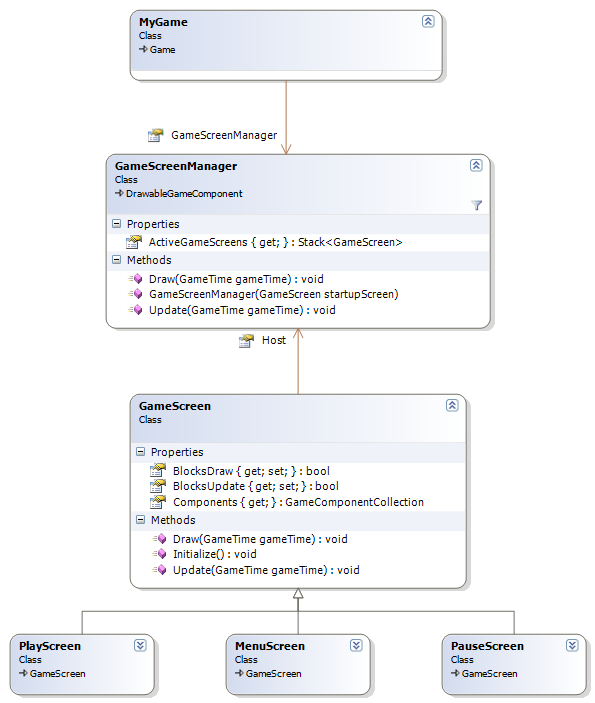
so why a stack? Let’s say, for example, that when the user pauses the game, you just want to stop everything from updating, and put an image over the top of everything that says “Paused.” With a stack, that’s easy: you can just push a new PauseScreen onto the stack. When the user unpauses, pop the PauseScreen back off again. To implement the “everything still draws, but nothing updates” functionality, we’ll add two new properties to GameScreen. BlocksDraw says that no screens under this one can draw, and BlocksUpdate does the same thing for update.

对于Update, GameScreenManager自顶向下遍历Stack中的GameScreens, 调用它们的Update方法, 直到遇到BlocksUpdate为true.

对于Draw, 和Update有点不同. Draw本是自底向上绘制的, 先绘制下面的GameScreen, 再绘制上面的GameSreen. 而BlocksDraw 的意思是指, 当前GameScreen以下的GameScreen不绘制. 于是要先遍历一遍Stack中的GameScreens, 找到那些可见的GameScreen, 然后再对这些GameScreen以自底向上的方式进行绘制.

1
2
3
4
5
6
7
8
9
10
11
12
List<GameScreen> screensToDraw = new List<GameScreen>();
foreach (GameScreen screen in ActiveGameScreens)
{
screensToDraw.Add( screen );
if (screen.BlocksDraw)
break;
}

for (int i = screensToDraw.Count - 1; i <= 0; i--)
{
screensToDraw[i].Draw( gameTime );
}

如何进行状态切换呢

We saw above how pause would work: PlayScreen watches for the pause key, and pushes on a new PauseScreen. PauseScreen watches for pause button, and pops itself off. GameScreenManager’s constructor takes a GameScreen for the startup screen

注意这里的PlayScreen. 作者将游戏逻辑放在该GameScreen中. 也就是说游戏的GameScreen和各种菜单的GameScreen地位是等同的. XNA官方的样例RolePlayingGameStarterKit, 也是这样做的. 而在ZombieSmash中, 是将游戏状态先分为Playing和Menu, Menu下面再进一步细分

1
2
3
4
5
6
7
8
9
10
11
12
13
14
15
16
17
18
19
20
21
22
23
24
25
26
27
28
29
30
31
32
33
34
35
36
37
public enum GameModes : int
{
Menu = 0,
Playing = 1
};

public enum MenuMode : int
{
Main = 0,
Pause = 1,
Dead = 2
}
/// <summary>
/// This is called when the game should draw itself.
/// </summary>
/// <param name="gameTime">Provides a snapshot of timing values.</param>
protected override void Draw(GameTime gameTime)
{
graphics.GraphicsDevice.Clear(Color.Black);

switch (gameMode)
{
case GameModes.Playing:
DrawGame();
hud.Draw();
break;
case GameModes.Menu:
if (menu.menuMode == Menu.MenuMode.Pause ||
menu.menuMode == Menu.MenuMode.Dead)
DrawGame();
menu.Draw();
break;
}


base.Draw(gameTime);
}

当处于GameModes.Menu模式时, 显示主菜单时不显示游戏画面, 如果是暂停和死亡, 仍然会显示游戏画面.

MonoGame笔记(X3)SpriteBatch Test

Posted on 2017-12-22 | In 编程

SpriteBatch.Begin的Matrix参数

1
2
3
4
5
spriteBatch.Begin(SpriteBlendMode.AlphaBlend, SpriteSortMode.FrontToBack,SaveStateMode.None,        Matrix.CreateTranslation(new Vector3(10, 10, 0)));

spriteBatch.Draw(pic1, new Vector2(0, 0), null, Color.White, 0.0f, Vector2.Zero, 1.0f, SpriteEffects.None, 1.0f);

spriteBatch.End();

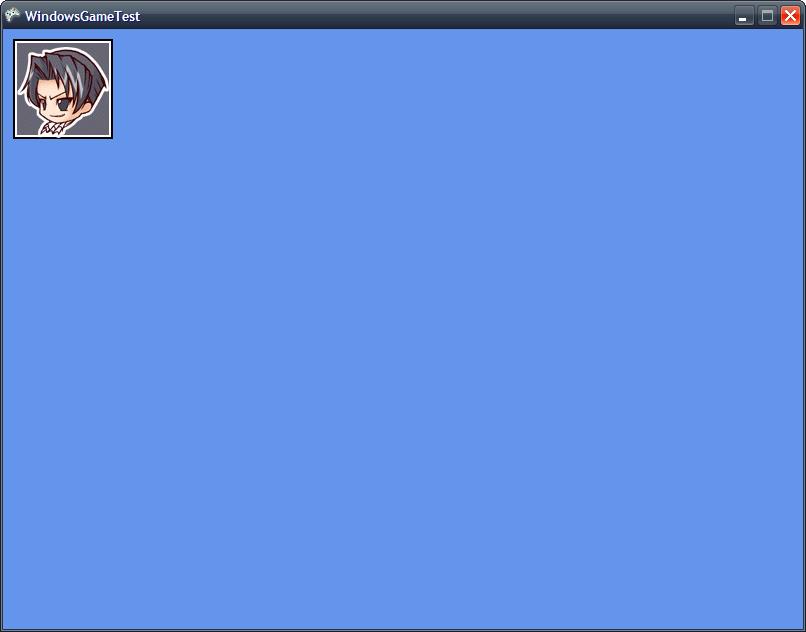
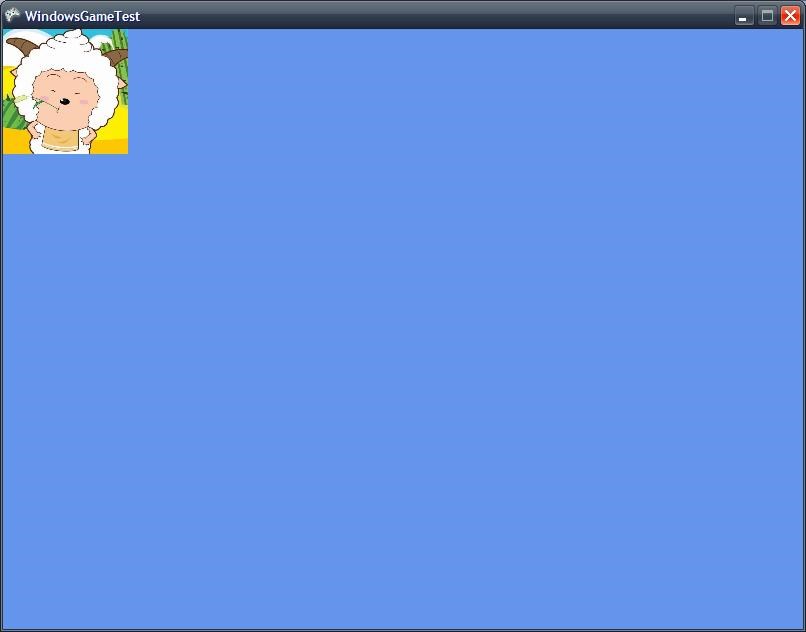
原本是将图片绘制在左上角的,但由于Matrix.CreateTranslation(new Vector3(10, 10, 0),结果如下

SpriteBatch.Draw的origin参数

1
2
3
spriteBatch.Draw(pic1, new Vector2(GraphicsDevice.Viewport.Width / 2, GraphicsDevice.Viewport.Height / 2), null, Color.White, 0.0f, Vector2.Zero, 1.0f, SpriteEffects.None, 0); 

spriteBatch.Draw(pic1, new Vector2(GraphicsDevice.Viewport.Width / 2, GraphicsDevice.Viewport.Height / 2), null, Color.White, 0.0f, new Vector2(100, 100), 1.0f, SpriteEffects.None, 0);

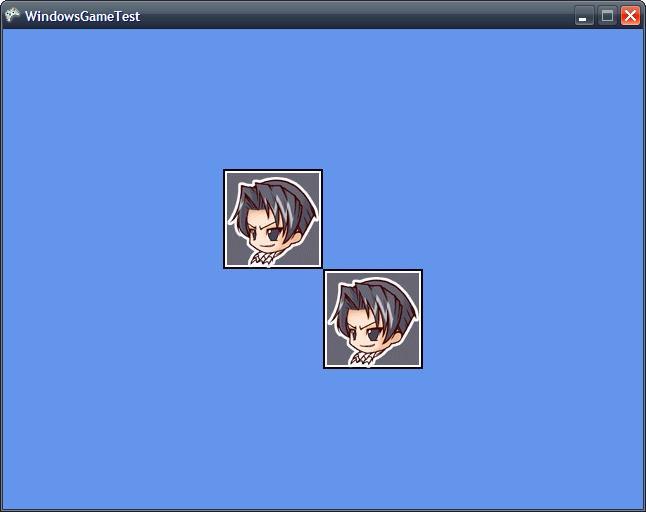
两者的区别在于origin参数不同,一个是Vector2(0,0),一个是Vector2(100,100),结果如下

从图中看出origin为(100,100),其实是从屏幕中心向左上偏移(100,100)。所以也可以通过改变origin移动图片。在卷轴类地图中用到这种技术。下面在此基础上又添加了scale值,而且可以通过方向键改变origin

1
2
3
4
5
6
7
8
9
10
11
12
13
14
15
16
17
18
19
20
21
22
23
24
25
26
27
28
29
30
31
32
33
34
35
36
37
38
39
40
41
42
43
44
45
46
47
48
49
50
51
52
53
54
float scale1 = 0.5f; 
float scale2 = 1.0f;
origin1 = Vector2.Zero;
origin2 = Vector2.Zero;

protected override void Update(GameTime gameTime)
{
// Allows the game to exit
if (GamePad.GetState(PlayerIndex.One).Buttons.Back == ButtonState.Pressed)
this.Exit();
if (Keyboard.GetState().IsKeyDown(Keys.Left))
{
origin1 += new Vector2(5, 0) / scale1;
origin2 += new Vector2(5, 0) / scale2;
}
if (Keyboard.GetState().IsKeyDown(Keys.Right))
{
origin1 -= new Vector2(5, 0) / scale1;
origin2 -= new Vector2(5, 0) / scale2;

}
if (Keyboard.GetState().IsKeyDown(Keys.Up))
{
origin1 += new Vector2(0, 5) / scale1;
origin2 += new Vector2(0, 5) / scale2;

}
if (Keyboard.GetState().IsKeyDown(Keys.Down))
{
origin1 -= new Vector2(0, 5) / scale1;
origin2 -= new Vector2(0, 5) / scale2;

}
// TODO: Add your update logic here

base.Update(gameTime);
}
protected override void Draw(GameTime gameTime)
{
GraphicsDevice.Clear(Color.CornflowerBlue);

// TODO: Add your drawing code here
spriteBatch.Begin(SpriteBlendMode.AlphaBlend, SpriteSortMode.FrontToBack, SaveStateMode.None);


spriteBatch.Draw(pic1, new Vector2(GraphicsDevice.Viewport.Width / 2, GraphicsDevice.Viewport.Height / 2 - 50),
null, Color.White, 0.0f, origin1, scale1, SpriteEffects.None, 0);

spriteBatch.Draw(pic1, new Vector2(GraphicsDevice.Viewport.Width / 2, GraphicsDevice.Viewport.Height / 2),
null, Color.White, 0.0f, origin2, scale2, SpriteEffects.None, 0);

spriteBatch.End();
base.Draw(gameTime);
}

注意在Update方法中,origin1和origin2增量不同,这是因为scale除了会影响图片的尺寸,也会使origin按比例改变。
比如origin1 += new Vector2(100,100), origin2 += new Vector2(100,100),由于scale1为0.5,其实origin2改变的距离只有(50,50),通过除以各自的比例,可以让两者移动的距离相同

SpriteBatch.Draw的layerDepth

1
2
3
4
5
6
7
spriteBatch.Begin(SpriteBlendMode.AlphaBlend, SpriteSortMode.FrontToBack, SaveStateMode.None);

spriteBatch.Draw(pic1, new Vector2(0, 0), null, Color.White, 0.0f, Vector2.Zero, 1.0f, SpriteEffects.None, 0.5f);

spriteBatch.Draw(pic2, new Vector2(0, 0), null, Color.White, 0.0f, Vector2.Zero, 0.25f, SpriteEffects.None, 1.0f);

spriteBatch.End();

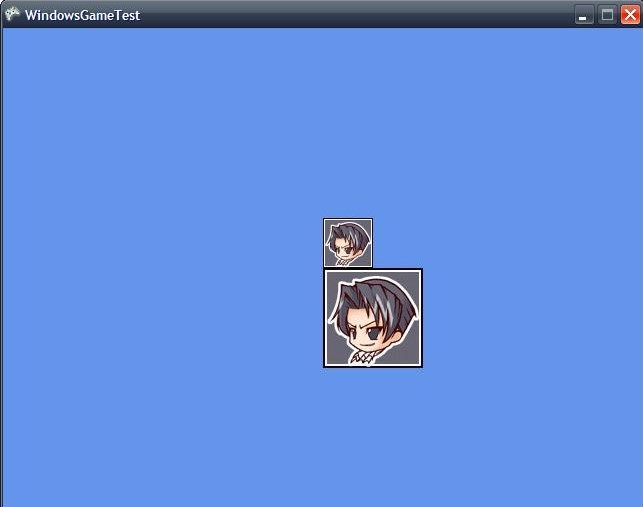
SpriteSortMode为FrontToBack的情况下,是pic1先画,pic2后画,因为pic2图片尺寸大于pic1,所以pic2会完全覆盖pic1.结果如下

如果改成
spriteBatch.Draw(pic1, new Vector2(0, 0), null, Color.White, 0.0f, Vector2.Zero, 1.0f, SpriteEffects.None, 1.0f); 则变成

虽然pic1和pic2的layerDepth是相等的,但从结果上来看是pic2先画,pic1后画。即使把SpriteSortMode改为BackToFront,结果不变。所以当两者的层深相等时,可以想象成后进先出的情况

SpriteBatch Winform实现

将texture的一部分(sRect),以origin为中心缩放和旋转(或翻转flip),然会绘制在画布的location位置。这里的重点是matrix的复合变换

SpriteBatch的Draw有一个color参数
ColorMatrix用于color tint

先绘制在temp上,对temp进行了color tint

xna中旋转是弧度,而gdi+中旋转是角度。

这里要注意的是以origin为中心,这里我将origin设置为sRect的中心,得到下面的points

这一步可以分成2步:

1
2
3
4
5
6
//1
Point[] points = new Point[] {
new Point(0, 0),
new Point(temp.Width, 0),
new Point(0, temp.Height)
};

1
2
3
4
5
6
7
8
//2  
matrix.Translate(-temp.with/2, -temp.height/2);//移回原点(0,0)

变成:
Point[] points = new Point[] {
new Point(-temp.Width/2, -temp.Height/2), new Point(temp.Width/2, -temp.Height/2),
new Point(-temp.Width/2, temp.Height/2)
}; //这三个点构成一个以原点(0,0)为中心的矩形

以origin为中心缩放和旋转,变成以原点为缩放和旋转,然后translate,再将变换应用到points上.

旋转缩放最好以原点(0,0)来进行

1
2
3
4
5
6
7
8
9
10
11
12
13
14
15
16
17
18
19
20
21
22
23
24
25
26
27
28
29
30
31
32
33
34
35
36
37
38
39
40
41
42
43
44
45
46
47
48
49
50
51
52
53
54
55
56
57
58
59
60
     private void DrawWithTransformation(Bitmap texture, Vector2 location, Rectangle sRect,/* Color color,*/ float rotation, Vector2 origin, Vector2 scale, bool flip, Graphics g)
{
//着色
Bitmap temp = new Bitmap(sRect.Width, sRect.Height);
Graphics tempGraphics = Graphics.FromImage(temp);


/*float[][] colorMatrixElements = {
new float[] {2, 0, 0, 0, 0}, // red scaling factor of 2
new float[] {0, 1, 0, 0, 0}, // green scaling factor of 1
new float[] {0, 0, 1, 0, 0}, // blue scaling factor of 1
new float[] {0, 0, 0, 1, 0}, // alpha scaling factor of 1
new float[] {.2f, .2f, .2f, 0, 1}}; // three translations of 0.2*/

float[][] colorMatrixElements =
{
new float[] {1, 0, 0, 0, 0}, // red scaling factor of 2
new float[] {0, 1, 0, 0, 0}, // green scaling factor of 1
new float[] {0, 0, 1, 0, 0}, // blue scaling factor of 1
new float[] {0, 0, 0, 1, 0}, // alpha scaling factor of 1
new float[] {0f, 0f, 0f, 0, 1}}; // three translations of 0.2*/


//float[][] cm = {1.0f, 0.0f, 0.0f, 0.0f, 0.0f},
// cm[1]new float[]{0.0f, 1.0f, 0.0f, 0.0f, 0.0f},
// cm[2]new float[]{-0.0f, 0.0f, 1.0f, 0.0f, 0.0f},
// cm[3]new float[]{0.0f, 0.0f, 0.0f, 1.0f, 0.0f},
// cm[4]new float[]{0.75f, 0.0f, 0.0f, 0.0f, 1.0f}};

ColorMatrix colorMatrix = new ColorMatrix(colorMatrixElements);
ImageAttributes imageAttributes = new ImageAttributes();
imageAttributes.SetColorMatrix(
colorMatrix,
ColorMatrixFlag.Default,
ColorAdjustType.Bitmap);


Rectangle tempRec = new Rectangle(0, 0, temp.Width, temp.Height);
tempGraphics.DrawImage(texture, tempRec, sRect.X, sRect.Y, sRect.Width, sRect.Height,
GraphicsUnit.Pixel, imageAttributes);

Matrix matrix = new Matrix();
matrix.Rotate(rotation * 180 / 3.1415926f);
//matrix.RotateAt(rotation*180/3.1415926f, new PointF((float)sRect.Width / 2f, 32f));
matrix.Scale((float)scale.X, (float)scale.Y, MatrixOrder.Append);
matrix.Translate((float)location.X, (float)location.Y, MatrixOrder.Append);

if (!flip) matrix.Scale(-1, 1);
//Point[] points = new Point[]{new Point(0, 0), new Point(temp.Width, 0),
// new Point(0, temp.Height)};

Point[] points = new Point[]
{
new Point(-temp.Width/2, -temp.Height/2), new Point(temp.Width/2, -temp.Height/2),
new Point(-temp.Width/2, temp.Height/2)
};

matrix.TransformPoints(points);
g.DrawImage(temp, points, tempRec, GraphicsUnit.Pixel);//图像的旋转和拉伸通常是通过在DrawImage中指定destPoints参数来实现,destPoints包含对新的坐标系定义的点的数据
}

MonoGame笔记(X2)SpriteFont

Posted on 2017-12-22 | In 编程

SpriteFont的使用如下(https://msdn.microsoft.com/en-us/library/bb447673.aspx):

1
2
3
4
5
6
7
8
9
10
11
12
13
14
15
16
17
18
19
20
21
22
23
24
25
26
27
28
29
30
31
SpriteFont Font1;
Vector2 FontPos;
protected override void LoadContent()
{
// Create a new SpriteBatch, which can be used to draw textures.
spriteBatch = new SpriteBatch(GraphicsDevice);
Font1 = Content.Load<SpriteFont>("Arial");

// TODO: Load your game content here
FontPos = new Vector2(graphics.GraphicsDevice.Viewport.Width / 2,
graphics.GraphicsDevice.Viewport.Height / 2);
}

protected override void Draw(GameTime gameTime)
{
GraphicsDevice.Clear(Color.CornflowerBlue);

spriteBatch.Begin();

// Draw Hello World
string output = "Hello World";

// Find the center of the string
Vector2 FontOrigin = Font1.MeasureString(output) / 2;
// Draw the string
spriteBatch.DrawString(Font1, output, FontPos, Color.LightGreen,
0, FontOrigin, 1.0f, SpriteEffects.None, 0.5f);

spriteBatch.End();
base.Draw(gameTime);
}

Arial.spritefont这个资源文件就是用来描述被加载的Arial字体的各种属性

1
2
3
4
5
6
7
8
9
10
11
12
13
14
15
16
17
18
19
20
21
22
23
24
25
26
27
28
29
30
31
32
33
34
35
36
37
38
39
40
41
42
43
44
45
46
47
48
49
50
51
52
53
54
55
<?xml version="1.0" encoding="utf-8"?>
<!--
This file contains an xml description of a font, and will be read by the XNA
Framework Content Pipeline. Follow the comments to customize the appearance
of the font in your game, and to change the characters which are available to draw
with.
-->
<XnaContent xmlns:Graphics="Microsoft.Xna.Framework.Content.Pipeline.Graphics">
<Asset Type="Graphics:FontDescription">

<!--
Modify this string to change the font that will be imported. Redistributable sample
fonts are available at http://go.microsoft.com/fwlink/?LinkId=104778&clcid=0x409.
-->
<FontName>Arial</FontName>

<!--
Size is a float value, measured in points. Modify this value to change
the size of the font.
-->
<Size>14</Size>

<!--
Spacing is a float value, measured in pixels. Modify this value to change
the amount of spacing in between characters.
-->
<Spacing>0</Spacing>

<!--
UseKerning controls the layout of the font. If this value is true, kerning information
will be used when placing characters.
-->
<UseKerning>true</UseKerning>

<!--
Style controls the style of the font. Valid entries are "Regular", "Bold", "Italic",
and "Bold, Italic", and are case sensitive.
-->
<Style>Bold</Style>

<!--
CharacterRegions control what letters are available in the font. Every
character from Start to End will be built and made available for drawing. The
default range is from 32, (ASCII space), to 126, ('~'), covering the basic Latin
character set. The characters are ordered according to the Unicode standard.
See the documentation for more information.
-->
<CharacterRegions>
<CharacterRegion>
<Start>&#32;</Start>
<End>&#126;</End>
</CharacterRegion>
</CharacterRegions>
</Asset>
</XnaContent>

为什么叫SpriteFont呢? 因为Font是以Sprite的方式被绘制的.MonoGame笔记(二)SpriteBatch中提到了DrawString方法的实现

1
2
3
4
5
6
7
8
9
10
11
12
13
14
15
16
17
18
19
20
21
22
23
24
25
26
27
28
29
30
31
32
33
34
35
36
37
38
39
40
41
42
43
public void DrawString(SpriteFont spriteFont, string text, Vector2 position, Color color)
{
if (spriteFont == null )
{
throw new ArgumentException("spriteFont");
}

Vector2 p = position;

foreach (char c in text)
{
if (c == '\n')
{
p.Y += spriteFont.LineSpacing;
p.X = position.X;
continue;
}
if (spriteFont.characterData.ContainsKey(c) == false)
continue;
GlyphData g = spriteFont.characterData[c];

SpriteBatchItem item = _batcher.CreateBatchItem();

item.Depth = 0.0f;
item.TextureID = (int) spriteFont._texture.ID;

Vector2 texCoordTL = spriteFont._texture.Image.GetTextureCoord ( g.Glyph.X, g.Glyph.Y );
Vector2 texCoordBR = spriteFont._texture.Image.GetTextureCoord ( g.Glyph.X+g.Glyph.Width, g.Glyph.Y+g.Glyph.Height );

item.Set
(
p.X,
p.Y+g.Cropping.Y,
g.Glyph.Width,
g.Glyph.Height,
color,
texCoordTL,
texCoordBR
);

p.X += (g.Kerning.Y + g.Kerning.Z + spriteFont.Spacing);
}
}

也可以使用中文字体

1
2
3
4
5
6
7
8
9
10
11
12
13
14
15
16
<?xml version="1.0" encoding="utf-8"?>
<XnaContent xmlns:Graphics="Microsoft.Xna.Framework.Content.Pipeline.Graphics">
<Asset Type="Graphics:FontDescription">
<FontName>华文行楷</FontName>
<Size>30</Size>
<Spacing>0</Spacing>
<UseKerning>true</UseKerning>
<Style>Regular</Style>
<CharacterRegions>
<CharacterRegion>
<Start>&#19968;</Start>
<End>&#40869;</End>
</CharacterRegion>
</CharacterRegions>
</Asset>
</XnaContent>

不过上述方式包含的汉字太多(2万多个), 一般只需要包含游戏中用到的汉字即可, 具体做法, 参考http://blog.csdn.net/jianxin160/article/details/6313518

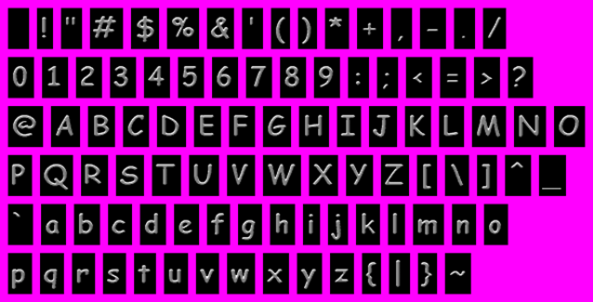
但这些系统自带的字体中规中矩, 游戏中很多效果往往要用到图片字

这张图片必须包含一个alpha通道, 洋红色的地方不透明, 字体黑色背景透明.

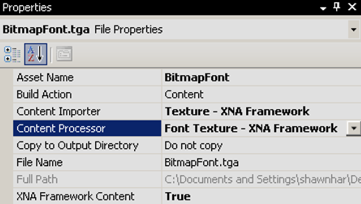
添加该资源文件是的属性面板设置, 使用FontTextureProcessor

1
2
3
4
5
6
7
8
9
10
11
12
13
14
15
16
17
18
19
20
21
22
23
24
25
26
27
28
29
30
31
32
33
34
35
36
37
38
39
40
41
42
43
44
45
46
47
48
49
50
51
52
53
public class FontTextureProcessor : ContentProcessor<Texture2DContent, SpriteFontContent>
{
private List<Glyph> ExtractGlyphs(PixelBitmapContent<Color> bitmap)
{
var glyphs = new List<Glyph>();
var regions = new List<Rectangle>();
for (int y = 0; y < bitmap.Height; y++)
{
for (int x = 0; x < bitmap.Width; x++)
{
if (bitmap.GetPixel(x, y) != transparentPixel)
{
// if we don't have a region that has this pixel already
var re = regions.Find(r => {
return r.Contains(x, y);
});
if (re == Rectangle.Empty)
{
// we have found the top, left of a image.
// we now need to scan for the 'bounds'
int top = y;
int bottom = y;
int left = x;
int right = x;
while (bitmap.GetPixel(right, bottom) != transparentPixel)
right++;
while (bitmap.GetPixel(left, bottom) != transparentPixel)
bottom++;
// we got a glyph :)
regions.Add(new Rectangle(left, top, right - left, bottom - top));
x = right;
}
else
{
x += re.Width;
}
}
}
}

for (int i = 0; i < regions.Count; i++)
{
var rect = regions[i];
var newBitmap = new PixelBitmapContent<Color>(rect.Width, rect.Height);
BitmapContent.Copy(bitmap, rect, newBitmap, new Rectangle(0, 0, rect.Width, rect.Height));
var glyph = new Glyph(GetCharacterForIndex (i), newBitmap);
glyph.CharacterWidths.B = glyph.Bitmap.Width;
glyphs.Add(glyph);
//newbitmap.Save (GetCharacterForIndex(i)+".png", System.Drawing.Imaging.ImageFormat.Png);
}
return glyphs ;
}
}

ExtractGlyphs被Process调用, 返回一个SpriteFontContent. 如此, 仍就可以使用上面的SpriteFont类, Content Pipeline消除了*.spritefont和bitmapfont之间的差异.

详细可以参考https://blogs.msdn.microsoft.com/shawnhar/2007/04/26/bitmap-fonts-in-xna/

1234…7

zmapleaf

67 posts
2 categories
11 tags
© 2020 zmapleaf
Powered by Hexo
|
Theme — NexT.Mist v5.1.4