远


  • Home

  • About

  • Tags

  • Categories

  • Archives

MonoGame笔记(六)Game与GUI的差异

Posted on 2017-12-04 | In 编程

上一篇笔记最后提到游戏是一种背景工作(background work)吗? 回答这个问题先要了解游戏和普通的GUI的区别在于哪里. 游戏和普通GUI程序最大的差异在于即使用户没有输入, 游戏内部也在进行大量的逻辑处理(物理碰撞, 人工智能等), 而普通的GUI程序则是根据用户输入进行某种响应. background work可以把系统的闲置资源充分利用起来, 适合于大型游戏.

在游戏和普通GUI程序之间, 还有第三个选择: 图形动画程序. 这种程序要将绘制逻辑放在Idle中来处理吗? 还是有其他的方法. 我觉得MSDN论坛的一个问题做了很好的解答.

Event Driven WPF vs XNA style looping
https://social.msdn.microsoft.com/Forums/en-US/356dd3b1-4168-46fa-bc1d-ba0137feb133/event-driven-wpf-vs-xna-style-looping?forum=wpf

解答如下:

The two options you listed are usually used because of the differences in how applications update:

1) Event-Driven is usually used because your application is responding to a user.
2) Loop-Driven is used when the application needs to update, regardless of user interaction. (Games, ie: XNA, often use this because the screen is updating even if the user is doing nothing).

The two are not mutually exclusive (互斥). In fact, it’s quite common to see an event based application start a timer that will trigger an “event” in a repeated “loop”. Typically, this is done differently than a loop-driven application, but the effect is similar.

I would recommend not using a full render loop style loop in a GUI-based application, however. They are very oriented towards games and attempts to have a near-realtime experience, and tend to cause user interaction to suffer. Instead, use a timer, such as the DispatcherTimer, or subscribe to CompositionTarget.Rendering when you need to have a loop-driven style. You can easily remove the event handler when you are done with your continual update.

他的意思是基于GUI的程序(普通GUI程序+图形动画程序)更适合用Timer去做. 而且, 放在Idle里面的话, 用户的输入会打断正在进行的逻辑处理.

进一步, WPF和Silverlight同样可以做游戏(卡牌, 页游等)

Game Programming with Silverlight一书中提到3种图形动画开发方式
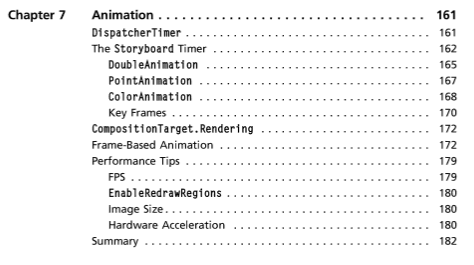
其中有两种就是上面提到的DispatcherTimer和CompositionTarget.Rendering, 另外一种是故事板(storyboard)

1
2
3
4
5
DispatcherTimer dispatcherTimer = new DispatcherTimer(DispatcherPriority.Normal);

dispatcherTimer.Tick += new EventHandler(TickGameLoop);
dispatcherTimer.Interval = TimeSpan.FromMilliseconds(40);//差不多24帧左右
dispatcherTimer.Start();
1
2
3
4
5
6
7
8
public partial class Page : UserControl
{
public Page()
{
InitializeComponent();
CompositionTarget.Rendering += new EventHandler(GameLoop);
}
}

另外可以参考Channel 9上的Creating Games with Silverlight: A Simple Shooter
https://channel9.msdn.com/coding4fun/articles/Creating-Games-with-Silverlight-A-Simple-Shooter

1
2
3
4
5
6
7
8
9
10
11
12
13
14
15
16
17
18
public Page()
{
InitializeComponent();
keyHandler = new KeyHandler(this);
GenerateStarField(350);
InitializeGame();
}

void InitializeGame()
{
gameLoop = new GameLoop(this);
gameLoop.Update += new GameLoop.UpdateHandler(gameLoop_Update);

PlayerShip = new Ship(10, 10, new Point(100, 360));
gameRoot.Children.Add(PlayerShip.SpriteCanvas);

gameLoop.Start();
}

这就是用Timer去模拟loop-driven的方式.

Silverlight在技术分类上等同于Flash, 可以想象Flash页游的GameLoop是怎样的一个实现, 关于Flash另外展开.

这里提到的full render loop style loop代码如下, 就是上一篇笔记提到的game loop
https://blogs.msdn.microsoft.com/tmiller/2005/05/05/my-last-post-on-render-loops-hopefully/
用在ManagedDX中(托管的DX)

1
2
3
4
5
6
7
8
9
10
11
12
13
14
15
16
17
18
19
20
21
22
23
24
25
26
27
28
29
30
31
32
33
34
35
36
37
38
39
40
41
42
43
44
45
46
//The most common topic on my blog returns again.  This time it will be brief as all I’m going to to do now is show you the render loop the June’05 SDK will be using.  A coworker in another group came up with this markedly simple, yet deceptively effective loop for that groups projects.  I liked it so much, i’m sharing it with everyone else. =)

//The basic loop (slightly modified from his original version and the version in the new SDK for ease of reading):

public void MainLoop()
{
// Hook the application’s idle event
System.Windows.Forms.Application.Idle += new EventHandler(OnApplicationIdle);
System.Windows.Forms.Application.Run(myForm);
}

private void OnApplicationIdle(object sender, EventArgs e)
{
while (AppStillIdle)
{
// Render a frame during idle time (no messages are waiting)
UpdateEnvironment();
Render3DEnvironment();
}
}

private bool AppStillIdle
{
get
{
NativeMethods.Message msg;
return !NativeMethods.PeekMessage(out msg, IntPtr.Zero, 0, 0, 0);
}
}

And the declarations for those two native methods members:

[StructLayout(LayoutKind.Sequential)]
public struct Message
{
public IntPtr hWnd;
public WindowMessage msg;
public IntPtr wParam;
public IntPtr lParam;
public uint time;
public System.Drawing.Point p;
}

[System.Security.SuppressUnmanagedCodeSecurity] // We won’t use this maliciously
[DllImport(“User32.dll”, CharSet=CharSet.Auto)]
public static extern bool PeekMessage(out Message msg, IntPtr hWnd, uint messageFilterMin, uint messageFilterMax, uint flags);
MonoGame笔记(五)轮询

Posted on 2017-12-04 | In 编程

笔记三和笔记四讲到MonoGame中的event driven input并不是真正意义的event driven, 只是在轮询的基础上采用了一种C# event的方式去封装. 然而Windows系统的确是事件驱动的. 深入浅出MFC第一章Win32基本程序概念提到

所有的GUI系统,包括UNIX的X Window 以及OS/2 的Presentation Manager,都像Windows那样,是以消息为基础的事件驱动系统。

以消息为基础, 以事件驱动之

以鼠标和键盘为例, 由Windows系统捕捉到之后, 将该输入封装成消息(message)放入系统队列(system queue)中, 之后在主事件循环(main event loop)中获取它(PeekMessage), 再派发(dispatch)给窗口处理函数(WndProc)

1
2
3
4
5
6
7
8
9
10
11
12
13
14
WndProc(hwnd, msg, wParam, lParam)
{
switch (msg) {
case WM_CREATE: ...
case WM_COMMAND: ...
case WM_LBUTTONDOWN: ...
case WM_KEYDOWN: ...
case WM_PAINT: ...
case WM_CLOSE: ...
case WM_DESTROY: ...
default: return DefWindowProc(...);
}
return(0);
}

WM_LBUTTONDOWN和WM_KEYDOWN分支就是对鼠标和键盘的输入处理. 而XNA是在每一帧Update时去检测鼠标和键盘的输入状态, 即每一帧轮询输入设备的状态. 为何XNA是这样处理的, 二者之间有什么差异, XNA和上面提到GUI有什么区别?

这些问题的答案存在于MonoGame的主事件循环中.笔记一中提到WinFormsGameWindow的RunLoop

1
2
3
4
5
6
7
8
9
10
11
12
13
14
15
16
17
18
19
20
21
22
23
24
25
26
27
28
29
30
31
32
33
34
35
36
37
38
39
40
41
42
43
internal void RunLoop()
{
// https://bugzilla.novell.com/show_bug.cgi?id=487896
// Since there's existing bug from implementation with mono WinForms since 09'
// Application.Idle is not working as intended
// So we're just going to emulate Application.Run just like Microsoft implementation
_form.Show();

var nativeMsg = new NativeMessage();
while (_form != null && _form.IsDisposed == false)
{
if (PeekMessage(out nativeMsg, IntPtr.Zero, 0, 0, 0))
{
Application.DoEvents();

if (nativeMsg.msg == WM_QUIT)
break;

continue;
}

UpdateWindows();
Game.Tick();
}

// We need to remove the WM_QUIT message in the message
// pump as it will keep us from restarting on this
// same thread.
//
// This is critical for some NUnit runners which
// typically will run all the tests on the same
// process/thread.

var msg = new NativeMessage();
do
{
if (msg.msg == WM_QUIT)
break;

Thread.Sleep(100);
}
while (PeekMessage(out msg, IntPtr.Zero, 0, 0, 1));
}

从上面的代码中可以看到, 当PeekMessage为false, 表示没有消息, 系统处于空闲状态(Idle)时, 才会执行Game.Tick方法. 即Game的逻辑和渲染是在Idle时执行的.

这是MonoGame的处理方式, 可能其他的framework不是这样处理的.那可以看看它的原生版XNA的处理方式

1
2
3
4
5
6
7
8
9
//Game.cs 
//host为GameHost

this.host.Idle += new EventHandler<EventArgs>(this.HostIdle);

private void HostIdle(object sender, EventArgs e)
{
this.Tick();//重头戏
}

Game调用host的Run方法, host的具体实现为WindowsGameHost, 它的Run方法如下

1
2
3
4
5
6
7
8
9
10
11
12
13
14
15
16
17
18
19
//WindowsGameHost.cs
internal override void Run()
{
if (this.doneRun)
{
throw new InvalidOperationException(Resources.NoMultipleRuns);
}
try
{
Application.Idle += new EventHandler(this.ApplicationIdle);
Application.Run(this.gameWindow.Form);
}
finally
{
Application.Idle -= new EventHandler(this.ApplicationIdle);
this.doneRun = true;
base.OnExiting();
}
}

注册了Winform的Application的Idle事件, 当系统空闲时, 调用ApplicationIdle方法.

1
2
3
4
5
6
7
8
9
10
11
12
13
14
15
private void ApplicationIdle(object sender, EventArgs e)
{
NativeMethods.Message message;
while (!NativeMethods.PeekMessage(out message, IntPtr.Zero, 0u, 0u, 0u))
{
if (this.exitRequested)
{
this.gameWindow.Close();
}
else
{
this.RunOneFrame();
}
}
}

再看RunOneFrame方法

1
2
3
4
5
6
7
8
9
internal override void RunOneFrame()
{
this.gameWindow.Tick();
base.OnIdle();
if (GamerServicesDispatcher.IsInitialized)
{
this.gameWindow.IsGuideVisible = Guide.IsVisible;
}
}

内部调用base.OnIdle. 而GameHost的Idle事件注册了Game的HostIdle, 而后者又调用了Tick方法.

其实从HostIdle顾名思义可以得出结论

1
2
3
4
private void HostIdle(object sender, EventArgs e)
{
this.Tick();//重头戏
}

Game是在Host空闲的时候才调用Tick方法. Host顾名思义就是Game寄宿的载体.可以是Windows的Winform, 也可以Android的View, 等等等等.

或许还会有疑问, 那只是MonoGame(XNA)的做法, 其他game framework并不一定如此吧.

于是查了一本经典老书: Windows游戏编程大师技巧
第二章产生一个实时事件循环

代码基于Win32平台, 没有framework封装, 已经接近底层了.

或许还有一丝存疑, 那是该书对Idle的运用, 将Game logic放在那里, 不一定都是这样吧. 那看一下非游戏编程的书是怎么描述Idle的运用的.

深入浅出MFC第一章Win32基本程序概念专门有一节是空闲时间的处理: OnIdle

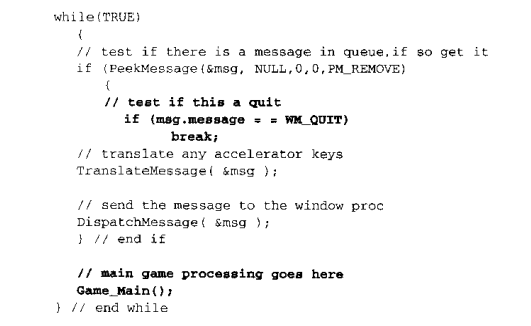
所谓空闲时间(idle time),是指「系统中没有任何消息等待处理」的时间。举个例子,没有任何程序使用定时器(timer,它会定时送来WM_TIMER),使用者也没有碰触键盘和鼠标或任何外围,那么,系统就处于所谓的空闲时间。空闲时间常常发生。不要认为你移动鼠标时产生一大堆的WM_MOUSEMOVE,事实上夹杂在每一个WM_MOUSEMOVE 之间就可能存在许多空闲时间。毕竟,计算机速度超乎想像。背景工作最适宜在空闲时间完成。传统的SDK 程序如果要处理空闲时间,可以以下列循环取代WinMain 中传统的消息循环:

1
2
3
4
5
6
7
8
9
10
while (TRUE) {
if (PeekMessage(&msg, NULL, 0, 0, PM_REMOVE) {
if (msg.message == WM_QUIT)
break;
TranslateMessage(&msg);
DispatchMessage(&msg);
} else {
OnIdle();
}
}

第6章的HelloMFC 将示范如何在MFC 程序中处理所谓的idle time

那有一个疑问: 游戏是背景工作吗? 要解答这样疑问看一篇笔记.

MonoGame笔记(四)XNA Simple GUI

Posted on 2017-12-03 | In 编程

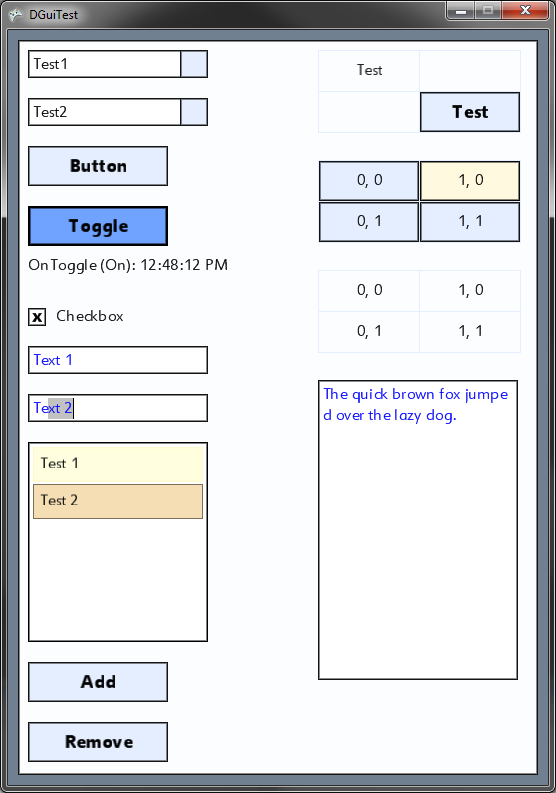
上一篇笔记介绍event driven input, 最后提到轮询与事件驱动. 这一篇先不讲这个. 上一篇提到btn.OnClick += ClickHandler. XNA没有提供GUI, 需要自己实现Button和其他控件. 有一个XNA Simple GUI,https://simplegui.codeplex.com/,

可以大致了解一下XNA中GUI的实现方式.组合模式加控件树倒没有多少问题, 主要看它是如何实现btn.OnClick += ClickHandler的.

XNA Simple GUI的使用方式如下:

1
2
3
4
5
6
7
8
9
10
11
12
13
DGuiManager guiManager = new DGuiManager(this, spriteBatch);

DForm form = new DForm(guiManager, "MainForm", null);
form.Size = new Vector2(640, 480);
form.Position = new Vector2(10, 10);
form.Initialize();
guiManager.AddControl(form);

DButton button = new DButton (guiManager, 5, 5, "Button"); // Button at 5,5 with text "Button"
button.Initialize();
form.AddPanel(button);

button.OnClick += new ButtonEventHandler(handleClick); // Register the click listener

DGuiManager 内含一棵UI控件树DGuiSceneGraph, 所有的UI控件继承DPanel, DPanel继承DGuiSceneNode

class DGuiManager : DrawableGameComponent
class DGuiSceneGraph : DrawableGameComponent
class DGuiSceneNode : DrawableGameComponent

DGuiManager 的Update调用_sceneGraph.Update(gameTime), 后者调用UpdateRecursive(gameTime, rootNode);

DGuiManager 的Draw调用_sceneGraph.Draw(gameTime), 后者调用DrawRecursive(gameTime, rootNode);

1
2
3
4
5
6
7
8
9
10
11
12
13
14
15
16
17
18
19
20
21
22
23
24
25
26
27
28
29
void UpdateRecursive(GameTime time, DGuiSceneNode node)
{
//Update node
node.Update(time);

// Set update index, for height calculations
_updateIndex++;
node.UpdateIndex = _updateIndex;

//Update children recursively
for (int i = 0; i < node.Children.Count; i++) // (SceneNode childNode in node.Children)
{
UpdateRecursive(time,node.Children[i]);
}
}

void DrawRecursive(GameTime gameTime, DGuiSceneNode node)
{
//Draw
if (node.Visible || node.AlwaysVisible)
{
node.Draw(gameTime);

for (int i = 0; i < node.Children.Count; i++)
{
DrawRecursive(gameTime, node.Children[i]);
}
}
}

Button的祖先如下:
DrawableGameComponent
DGuiSceneNode
DPanel
DButtonBase
DButton

DButton继承自DrawableGameComponent, 下面是Button的Update, 可以看到Button的OnClick仍旧是每帧轮询的方式. 当它检测到自己被点击时, 调用事件处理方法.

1
2
3
4
5
6
7
8
9
10
11
12
13
14
15
16
17
18
19
20
21
22
23
24
25
26
27
28
29
30
31
32
33
34
35
36
37
38
39
40
以Button的Update为例, Button内没有Draw方法

/// <summary>
/// Allows the game to run logic such as updating the world,
/// checking for collisions, gathering input, and playing audio.
/// </summary>
/// <param name="gameTime">Provides a snapshot of timing values.</param>
public override void Update(GameTime gameTime)
{
MouseState ms = Mouse.GetState();

base.Update(gameTime);

Vector2 absPos = new Vector2(AbsoluteTransform.X, AbsoluteTransform.Y);

// Is mouse hovering over?
if (Visible)
{
if (IsMouseHoveringOver && IsFocused)
{
// Mouse click?
if (ms.LeftButton == ButtonState.Pressed && buttonState == DButtonState.Off)
OnLeftMouseDown(gameTime);//事件
else if (ms.LeftButton == ButtonState.Released && buttonState == DButtonState.On)
{
OnLeftMouseUp(gameTime);
if (OnClick != null)
OnClick(gameTime);
}
}
else
{
// turn it off if the mouse hovers off it
if (buttonState == DButtonState.On)
OnLeftMouseUp(gameTime);
}
}

base.Update(gameTime);
}

Button在调用Update的时候, 它得判断鼠标是点的它, 而不是点另一个按钮.
下面是Button的基类DPanel的Update方法中所做的判断

1
2
3
4
5
6
7
8
9
10
11
12
13
14
15
16
// Is mouse hovering over?
if (ms.X > absPos.X && ms.X < (absPos.X + _size.X) &&
ms.Y > absPos.Y && ms.Y < (absPos.Y + _size.Y))
{
_isMouseHoveringOver = true;

if (_hoverEventsEnabled == false)
HoverEnter();

if (ms.LeftButton == ButtonState.Released)
_hasHoveredBeforeClick = true;
else if (_hasHoveredBeforeClick)
{
_guiManager.FocusListEnqueue(this);
}
}

MonoGame笔记(三)Event-driven Input

Posted on 2017-12-03 | In 编程

XNA中Input的检测是放在Update方法中的, 也就是说每一帧都在轮询输入设备

1
2
3
4
5
6
7
8
9
KeyboardState keyboardState = Keyboard.GetState( );
if (keyboardState.IsKeyDown(Keys.Left))
ringsPosition.X -= ringsSpeed;
if (keyboardState.IsKeyDown(Keys.Right))
ringsPosition.X += ringsSpeed;
if (keyboardState.IsKeyDown(Keys.Up))
ringsPosition.Y -= ringsSpeed;
if (keyboardState.IsKeyDown(Keys.Down))
ringsPosition.Y += ringsSpeed;

这种方式跟Flash或者U3D的使用经验不同, 也和WPF/Winform的开发方式不同.
后者的使用方式类似btn.OnClick += ClickHanlder/btn.addClickListener(ClickHandler)/
btn.addListener(Mouse.Click, ClickHandler)

GitHub上有一个MonoGame-EventDriven-Input项目
https://github.com/ClassicThunder/MonoGame-EventDriven-Input

作者提到轮询方式的缺点:

XNA has a rather severe limitation with regards to handling keyboard input. It is unable detect any keystrokes that occur between pollings. Because of this if your game is updating at the default 60 fps there are 0.017 seconds between polls can be too slow for individual characters of memorized sequences such as “ing”. This method also has the advantage of behaving consistently with other applications, the double click time, character repeat time, etc… are all controlled by your windows settings.

两帧之间的Input检测不到

那它是如何做到Event-driven的? 以下是使用方式

1
2
3
4
5
6
7
8
9
Input _eventDrivenInput;
_eventDrivenInput = new MonoGameInput(this);

_eventDrivenInput.Update(gameTime);

_eventDrivenInput.KeyDown += (sender, keyDown) =>
{
//Subscribe to the events
};

Using the library is very simple. Simple create an instance of the MonoGameInput object, call Update in the Game.Update function, and then subscribe to the events.

在Game.Update中调用_eventDrivenInput.Update(gameTime);

看MonoGameInput的Update

1
2
3
4
5
6
7
8
9
10
11
12
13
public sealed class MonoGameInput : Input
{
private readonly MonoGameMouseEvents _mouseEvents;
private readonly MonoGameKeyboardEvents _monoGameKeyboardEvents;
private readonly MonoGameTouchEvents _monoGameTouchEvents;

override public void Update(GameTime gameTime)
{
_mouseEvents.Update(gameTime);
_monoGameKeyboardEvents.Update(gameTime);
_monoGameTouchEvents.Update(gameTime);
}
}

再看MonoGameMouseEvents的Update

1
2
3
4
5
6
7
8
9
10
11
12
13
14
15
16
17
18
19
20
21
22
23
24
25
26
27
28
29
30
31
32
33
34
35
36
37
38
39
40
41
42
43
44
45
46
47
48
49
50
51
52
53
54
55
56
57
58
59
60
61
62
63
64
65
66
67
68
69
70
71
72
73
74
75
76
77
78
79
80
81
82
83
84
85
86
87
88
89
90
91
92
93
94
95
96
97
98
99
100
101
102
103
104
105
106
107
108
109
110
111
112
113
114
115
116
117
118
119
120
121
122
123
124
125
126
127
128
129
130
131
132
133
134
135
136
137
138
139
140
141
142
143
144
145
146
147
148
149
150
151
152
153
154
155
156
157
158
159
160
161
162
163
164
165
166
167
internal class MonoGameMouseEvents
{
internal event EventHandler<MouseEventArgs> ButtonReleased;
internal event EventHandler<MouseEventArgs> ButtonPressed;
internal event EventHandler<MouseEventArgs> ButtonDoubleClicked;
internal event EventHandler<MouseEventArgs> MouseMoved;
internal event EventHandler<MouseEventArgs> MouseWheelMoved;

private MouseState _previous;
private MonoGameMouseEventArgs _lastClick;

internal void Update(GameTime gameTime)
{
var current = Mouse.GetState();

// Check button press events.
if (current.LeftButton == ButtonState.Pressed
&& _previous.LeftButton == ButtonState.Released)
{
OnButtonPressed(this, new MonoGameMouseEventArgs(
current.X,
current.Y,
gameTime.TotalGameTime,
_previous,
current,
MouseButton.Left));
}

if (current.MiddleButton == ButtonState.Pressed
&& _previous.MiddleButton == ButtonState.Released)
{
OnButtonPressed(this, new MonoGameMouseEventArgs(
current.X,
current.Y,
gameTime.TotalGameTime,
_previous,
current,
MouseButton.Middle));
}

if (current.RightButton == ButtonState.Pressed
&& _previous.RightButton == ButtonState.Released)
{
OnButtonPressed(this, new MonoGameMouseEventArgs(
current.X,
current.Y,
gameTime.TotalGameTime,
_previous,
current,
MouseButton.Right));
}

if (current.XButton1 == ButtonState.Pressed
&& _previous.XButton1 == ButtonState.Released)
{
OnButtonPressed(this, new MonoGameMouseEventArgs(
current.X,
current.Y,
gameTime.TotalGameTime,
_previous,
current,
MouseButton.XButton1));
}

if (current.XButton2 == ButtonState.Pressed
&& _previous.XButton2 == ButtonState.Released)
{
OnButtonPressed(this, new MonoGameMouseEventArgs(
current.X,
current.Y,
gameTime.TotalGameTime,
_previous,
current,
MouseButton.XButton2));
}

// Check button releases.
if (current.LeftButton == ButtonState.Released
&& _previous.LeftButton == ButtonState.Pressed)
{
OnButtonReleased(this, new MonoGameMouseEventArgs(
current.X,
current.Y,
gameTime.TotalGameTime,
_previous,
current,
MouseButton.Left));
}

if (current.MiddleButton == ButtonState.Released
&& _previous.MiddleButton == ButtonState.Pressed)
{
OnButtonReleased(this, new MonoGameMouseEventArgs(
current.X,
current.Y,
gameTime.TotalGameTime,
_previous,
current,
MouseButton.Middle));
}

if (current.RightButton == ButtonState.Released
&& _previous.RightButton == ButtonState.Pressed)
{
OnButtonReleased(this, new MonoGameMouseEventArgs(
current.X,
current.Y,
gameTime.TotalGameTime,
_previous,
current,
MouseButton.Right));
}

if (current.XButton1 == ButtonState.Released
&& _previous.XButton1 == ButtonState.Pressed)
{
OnButtonReleased(this, new MonoGameMouseEventArgs(
current.X,
current.Y,
gameTime.TotalGameTime,
_previous,
current,
MouseButton.XButton1));
}

if (current.XButton2 == ButtonState.Released
&& _previous.XButton2 == ButtonState.Pressed)
{
OnButtonReleased(this, new MonoGameMouseEventArgs(
current.X,
current.Y,
gameTime.TotalGameTime,
_previous,
current,
MouseButton.XButton2));
}

// Check for any sort of mouse movement. If a button is down, it's a drag,
// otherwise it's a move.
if (_previous.X != current.X || _previous.Y != current.Y)
{
OnMouseMoved(this, new MonoGameMouseEventArgs(
current.X,
current.Y,
gameTime.TotalGameTime,
_previous,
current));
}

// Handle mouse wheel events.
if (_previous.ScrollWheelValue != current.ScrollWheelValue)
{
var value = current.ScrollWheelValue / 120;
var delta = (current.ScrollWheelValue - _previous.ScrollWheelValue) / 120;
OnMouseWheelMoved(this, new MonoGameMouseEventArgs(
current.X,
current.Y,
gameTime.TotalGameTime,
_previous,
current,
MouseButton.None,
value,
delta));
}

_previous = current;
}

这里仍旧是在Update中遍历Mouse的状态, 依旧是轮询的方式. 只是在使用方式了采取了一种类似event-driven的写法, 不是真正的event-driven吧, 不知道是不是我的理解错了.

那为什么在XNA中是轮询(Polling), 而不是事件驱动(Event Driven)? 其他引擎呢? 像Flash默认是事件监听来响应输入的. 后面的笔记会试图回答这些问题.

MedicalImaging笔记(X1) FoDicom传输(三)ThreadPoolQueue介绍

Posted on 2017-12-02 | In 编程

网上找FoDicom资料时, 发现dicomservice早期版本用的是ThreadPoolQueue http://blog.csdn.net/zssureqh/article/details/50637387
Dicomservice目前使用的是C#5.0引入的async和await, 之前使用的是C# 4.0引入的Task, 再之前使用的是C#1.0的Begin/End(APM)
其中Task版本用到了TaskQueue, 内部调用Task.Run(() => this.ExecuteProc(group));
APM版本用到了ThreadPoolQueue, 内部调用ThreadPool.QueueUserWorkItem(ExecuteProc, group);

ThreadPoolQueue和TaskQueue的逻辑是一样的, 只是将ThreadPool替换为了Task, 只需要看ThreadPoolQueue

可以从旧版本的Dicomservice的EndReadPDU处开始看起
EndReadPDU表示结束读取收到的PDU包

1
2
case 0x04: //PDataTF (带数据)
_processQueue.Queue(ProcessPDataTF, pdu);

_processQueue为ThreadPoolQueue, 其他case都是ACSE(见之前的笔记), 直接调用OnReceiveAssociationAccept等方法处理

ProcessPDataTF方法内部:

1
2
3
4
5
6
if (DicomMessage.IsRequest(_dimse.Type)) ThreadPool.QueueUserWorkItem(PerformDimseCallback, _dimse);
else
_processQueue.Queue(
(_dimse as DicomResponse).RequestMessageID,
PerformDimseCallback,
_dimse);

如果_dimse是request, 则直接交由ThreadPool去执行
如果_dimse是response, 则放入ThreadPoolQueue中

看看ThreadPoolQueue的Queue方法做了什么

1
2
3
4
5
6
7
8
9
10
11
12
13
14
15
16
17
18
19
20
21
22
23
24
25
26
27
28
29
30
31
32
33
34
35
36
37
38
39
40
41
42
43
44
public void Queue(WaitCallback callback, object state) {
Queue(new WorkItem {
Group = DefaultGroup,
Callback = callback,
State = state
});
}

private void Queue(WorkItem item) {
lock (_lock) {
WorkGroup group = null;
if (!_groups.TryGetValue(item.Group, out group)) {
group = new WorkGroup(item.Group);
_groups.Add(item.Group, group);
}

lock (group.Lock)
group.Items.Enqueue(item);

Execute(item.Group);//按组来执行
}
}

private void Execute(T groupKey) {
WorkGroup group = null;
lock (_lock) {
if (!_groups.TryGetValue(groupKey, out group))
return;
}

lock (group.Lock) {
if (group.Executing)
return;

if (group.Items.Count == 0 && !group.Key.Equals(DefaultGroup)) {
_groups.Remove(groupKey);
return;
}

group.Executing = true;

ThreadPool.QueueUserWorkItem(ExecuteProc, group);
}
}

ExecuteProc: 内部最终执行

1
2
3
4
5
6
7
8
try {
if (item.Action != null)
item.Action();
else if (item.Callback != null)
item.Callback(item.State);
} catch {
// log this somewhere?
}

从代码中可以这样理解ThreadPoolQueue的Queue方法:

  1. 将Item放入queue
  2. 如果当前queue没有执行, 则将该queue放入线程池中执行
  3. 如果当前queue正在执行, 则返回

于是会出现这样一种情况: 多次调用Queue方法, 但此时queue在执行, 则item会在queue中累积

为何要这样做, 从fodicom自带的ThreadPoolQueueTest中可以看到
public void Queue_OrderOfExecutionForSameKey_ShouldBeFifo()

为何要这样设计, 对于response需要FIFO? 其中一点认识: C-Get和C-Move都是复合操作, 对于响应的顺序比较重要.

文件链接:

TaskQueue.cs
https://github.com/fo-dicom/fo-dicom/blob/b386e73e3b33c6de3bb7c4400464e0c2e010dbad/DICOM/Threading/TaskQueue.cs

TaskQueueTest.cs
https://github.com/fo-dicom/fo-dicom/blob/b386e73e3b33c6de3bb7c4400464e0c2e010dbad/DICOM%20%5BUnit%20Tests%5D/Threading/TaskQueueTest.cs

ThreadPoolQueue.cs
https://github.com/fo-dicom/fo-dicom/blob/12f4e225b250e3107d4ecb5f9404fa12e18a3dcd/DICOM/Threading/ThreadPoolQueue.cs

ThreadPoolQueueTest.cs
https://github.com/fo-dicom/fo-dicom/blob/12f4e225b250e3107d4ecb5f9404fa12e18a3dcd/DICOM%20%5BUnit%20Tests%5D/Threading/ThreadPoolQueueTest.cs

DicomService.cs (使用ThreadPoolQueue)
https://github.com/fo-dicom/fo-dicom/blob/12f4e225b250e3107d4ecb5f9404fa12e18a3dcd/DICOM/Network/DicomService.cs

下面是单元测试程序

1
2
3
4
5
6
7
8
9
10
11
12
13
14
15
16
17
18
19
20
21
22
23
24
25
26
27
28
29
30
31
32
33
34
35
36
37
38
39
40
41
42
43
44
45
46
47
48
49
50
51
52
53
54
55
56
57
58
59
60
61
62
63
64
65
66
67
68
69
70
71
72
73
74
75
76
77
78
79
80
81
82
83
84
85
86
87
88
89
90
91
92
93
94
95
96
97
98
99
100
101
102
103
104
105
106
107
108
109
110
111
112
113
114
115
116
117
118
119
120
121
122
123
124
125
126
127
128
129
130
131
132
133
134
135
136
137
138
139
140
141
142
143
144
145
146
147
148
149
150
151
152
153
154
155
156
157
158
159
160
161
162
163
164
165
166
167
168
169
170
171
172
173
174
175
176
177
178
179
180
181
182
183
184
185
186
187
188
189
190
191
192
193
194
195
196
197
198
199
200
201
202
203
204
205
206
207
208
209
210
211
212
213
214
215
216
217
218
219
220
221
222
223
224
225
226
227
228
229
230
231
232
233
234
235
236
237
238
239
240
241
242
243
244
245
246
247
248
249
250
251
252
253
254
255
256
257
258
259
260
261
262
263
264
265
266
267
268
269
270
271
272
273
274
下面是单元测试程序:
using System;
using System.Collections.Generic;
using System.Diagnostics.Contracts;
using System.Linq;
using System.Text;
using System.Threading;
using System.Threading.Tasks;

namespace ThreadQueuePoolTest
{
public class Program
{
static void Main(string[] args)
{
Queue_OrderOfExecutionForSameKey_ShouldBeFifo();
}

static void Queue_OrderOfExecutionForSameKey_ShouldBeFifo()
{
string[] expected = { "Group 1: ", "Group 2: ", "Group 3: " };
string[] actual = { "Group 1: ", "Group 2: ", "Group 3: " };
bool[] finished = { false, false, false };
var handle = new ManualResetEventSlim(false);
var pool = new ThreadPoolQueue<int>(int.MinValue);

for (var i = 0; i < 99; ++i)
{
var group = i % 3;
expected[group] += string.Format("B{0}E{0} ", i);
pool.Queue(
group,
state =>
{
actual[group] += string.Format("B{0}", state);
Thread.Sleep(1);
actual[group] += string.Format("E{0} ", state);
Thread.Sleep(1);
if ((int)state > 96)
{
finished[group] = true;
if (finished.All(f => f)) handle.Set();
}
},
i);
}
handle.Wait(1000);

foreach (var item in expected)
{
Console.WriteLine(item);
}

Console.WriteLine("\n");
foreach (var item in actual)
{
Console.WriteLine(item);
}

Console.ReadLine();
}
}

class ThreadPoolQueue<T>
{
private class WorkItem
{
public T Group;
public Action Action;
public System.Threading.WaitCallback Callback;
public object State;
}

private class WorkGroup
{
public T Key;
public object Lock = new object();
public volatile bool Executing = false;
public Queue<WorkItem> Items = new Queue<WorkItem>();

public WorkGroup(T key)
{
Key = key;
}
}

private object _lock = new object();
private Dictionary<T, WorkGroup> _groups;

public ThreadPoolQueue(T defaultGroup = default(T))
{
_groups = new Dictionary<T, WorkGroup>();
Linger = 200;
DefaultGroup = defaultGroup;
}

/// <summary>Time in milliseconds (MS) to keep the WorkGroup alive after processing last item.</summary>
public int Linger
{
get;
set;
}

/// <summary>Value of key for default group.</summary>
public T DefaultGroup
{
get;
set;
}

public void Queue(Action action)
{
Queue(new WorkItem
{
Group = DefaultGroup,
Action = action
});
}

public void Queue(WaitCallback callback)
{
Queue(new WorkItem
{
Group = DefaultGroup,
Callback = callback
});
}

public void Queue(WaitCallback callback, object state)
{
Queue(new WorkItem
{
Group = DefaultGroup,
Callback = callback,
State = state
});
}

public void Queue(T group, Action action)
{
Queue(new WorkItem
{
Group = group,
Action = action
});
}

public void Queue(T group, WaitCallback callback)
{
Queue(new WorkItem
{
Group = group,
Callback = callback
});
}

public void Queue(T group, WaitCallback callback, object state)
{
Queue(new WorkItem
{
Group = group,
Callback = callback,
State = state
});
}

private void Queue(WorkItem item)
{
lock (_lock)
{
WorkGroup group = null;
if (!_groups.TryGetValue(item.Group, out group))
{
group = new WorkGroup(item.Group);
_groups.Add(item.Group, group);
}

lock (group.Lock)
group.Items.Enqueue(item);

Execute(item.Group);
}
}

private void Execute(T groupKey)
{
WorkGroup group = null;
lock (_lock)
{
if (!_groups.TryGetValue(groupKey, out group))
return;
}

lock (group.Lock)
{
if (group.Executing)
return;

if (group.Items.Count == 0 && !group.Key.Equals(DefaultGroup))
{
_groups.Remove(groupKey);
return;
}

group.Executing = true;

ThreadPool.QueueUserWorkItem(ExecuteProc, group);
}
}

private void ExecuteProc(object state)
{
var group = (WorkGroup)state;

do
{
WorkItem item = null;

bool empty;
lock (group.Lock)
{
empty = group.Items.Count == 0;

if (!empty)
item = group.Items.Dequeue();
}

if (empty)
{
var linger = DateTime.Now.AddMilliseconds(Linger);
while (empty && DateTime.Now < linger)
{
Thread.Sleep(0);
lock (_lock)
{
empty = group.Items.Count == 0;

if (!empty)
item = group.Items.Dequeue();
}
}

if (empty)
{
lock (_lock)
{
lock (group.Lock)
group.Executing = false;

if (!group.Key.Equals(DefaultGroup))
_groups.Remove(group.Key);

return;
}
}
}

try
{
if (item.Action != null)
item.Action();
else if (item.Callback != null)
item.Callback(item.State);
}
catch
{
// log this somewhere?
}
} while (true);
}

}

}

MedicalImaging笔记(X1) FoDicom传输(二)DICOMService

Posted on 2017-12-02 | In 编程

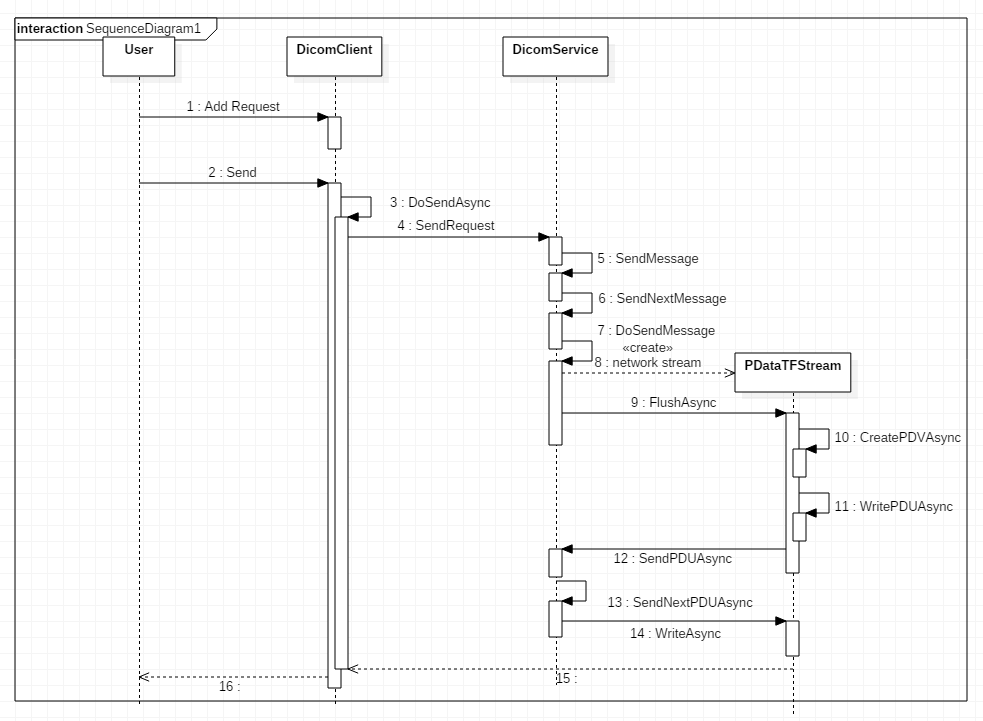
上一个笔记最后提到SendRequest, 以下是SendRequest的序列图, 不是十分准确, 但可以有个大概的浏览.

序列图当中, SendNextMessage和DoSendMessage是DicomService中两个重要的方法.

先看SendNextMessage方法

1
2
3
4
5
6
7
8
9
10
11
12
13
14
15
16
17
18
19
20
21
22
23
24
25
26
27
28
29
30
31
32
33
34
35
36
37
38
39
40
private void SendNextMessage()
{
while (true)
{
DicomMessage msg;
lock (_lock)
{
if (_sending)
{
break;
}

if (_msgQueue.Count == 0)
{
if (_pending.Count == 0) OnSendQueueEmpty();//
break;
}

if (Association.MaxAsyncOpsInvoked > 0
&& _pending.Count(req => req.Type != DicomCommandField.CGetRequest)
>= Association.MaxAsyncOpsInvoked)
{
break;
}

_sending = true;

msg = _msgQueue.Dequeue();

if (msg is DicomRequest)
{
_pending.Add(msg as DicomRequest);
}
}

DoSendMessage(msg);

lock (_lock) _sending = false;
}
}

里面出现2个数据结构: Queue<DicomMessage> _msgQueue 与 List<DicomRequest> _pending;
当request得到response的时候, 该msg才会从_pending列表中删除,
若_msgQueue和_pending都为空时, 即传输队列为空时, 会调用OnSendQueueEmpty

OnSendQueueEmpty在DicomClient中override

1
2
3
4
5
6
7
8
9
10
11
12
13
/// <summary>
/// Action to perform when send queue is empty.
/// </summary>
protected override void OnSendQueueEmpty()
{
lock (this.locker)
{
if (LingerTask == null || LingerTask.IsCompleted)
{
LingerTask = LingerAsync();
}
}
}

调用了LingerAsync();

linger是逗留的意思, 例如逗留50ms之后释放链接

1
2
3
4
5
6
7
8
9
10
11
12
13
14
15
16
17
18
19
private async Task LingerAsync()
{
while (true)
{
var disconnected = await ListenForDisconnectAsync(client.Linger, false).ConfigureAwait(false);

if (disconnected)
{
SetComplete();
break;
}

if (IsSendQueueEmpty)
{
await DoSendAssociationReleaseRequestAsync().ConfigureAwait(false);
break;
}
}
}

即在Client调用Send之后, 若一段时间内没有新的Request加入, 并且旧的request已经得到响应, 那么Client会释放与服务端的连接.

再看DoSendMessage方法
DoSendMessage方法代码比较多, 主要有3步

  1. 构造Dimse (序列图中省略了)
  2. 构造PDataTFStream, 作为Dimse的成员; DicomService也是PDataTFStream构造方法的参数之一
  3. 调用PDataTFStream的FlushAsync方法

PDataTFStream顾名思义是用来构造读写P-Data-TF, 它的两个方法:

  1. CreatePDVAsync
  2. WritePDVAsync

WritePDVAsync中调用DicomService的SendPDUAsync来真正发送PDU, 写到网络流中
为何SendPDUAsync是在DicomService, 而不是在PDataTFStream中
从代码中看出, SendPDUAsync还需要对PDU进行一些逻辑处理: 拥塞控制
_pduQueue中有最大容量限制

1
2
3
4
5
6
7
8
9
10
11
12
13
14
15
protected async Task SendPDUAsync(PDU pdu)
{
// _pduQueueWatcher = new ManualResetEventSlim(true);
// 第一次执行时不会阻塞, _pduQueueWatcher构造成Signaled状态
_pduQueueWatcher.Wait();//阻塞, 等SendNextPDUAysnc完成的信号

lock (_lock)
{
_pduQueue.Enqueue(pdu);
if (_pduQueue.Count >= MaximumPDUsInQueue)
_pduQueueWatcher.Reset();//即使前面Wait通过, 这里也阻塞
}

await SendNextPDUAsync().ConfigureAwait(false);
}
1
2
3
4
5
6
7
8
9
10
11
12
13
14
15
16
17
18
19
20
21
22
23
24
25
26
27
28
29
30
31
32
33
34
private async Task SendNextPDUAsync()
{
while (true)
{
if (!IsConnected) return;

PDU pdu;

lock (_lock)
{
if (_writing) return;

if (_pduQueue.Count == 0) return;

_writing = true;

pdu = _pduQueue.Dequeue();
if (_pduQueue.Count < MaximumPDUsInQueue) _pduQueueWatcher.Set();
}

if (Options.LogDataPDUs && pdu is PDataTF) Logger.Info("{logId} -> {pdu}", LogID, pdu);

var ms = new MemoryStream();
pdu.Write().WritePDU(ms);

var buffer = ms.ToArray();

try
{
await _network.AsStream().WriteAsync(buffer, 0, (int)ms.Length).ConfigureAwait(false);
} Catch(...)
lock (_lock) _writing = false;
}
}
1
2
pdu = _pduQueue.Dequeue();
if (_pduQueue.Count < MaximumPDUsInQueue) _pduQueueWatcher.Set();

ManualResetEventSlim简介

  • A slimmed down version of ManualResetEvent.
  • Better performance than ManualResetEvent when wait times are expected to be very short
  • Wait和Reset的区别
    _pduQueueWatcher = new ManualResetEventSlim(true);//Event is signaled
    • 第一次调用Wait, 通过;
    • 第一次调用Reset, 阻塞; 将Event从Signaled重置为NonSignaled

以上介绍的是SendRequest的大致过程, DicomService中另一大块是接收消息, 下面三个方法是重点
ListenAndProcessPDUAsync
ProcessPDataTFAsync
PerformDimse

具体见代码了

MedicalImaging笔记(X1) FoDicom传输(一)Scp和Scu

Posted on 2017-12-02 | In 编程

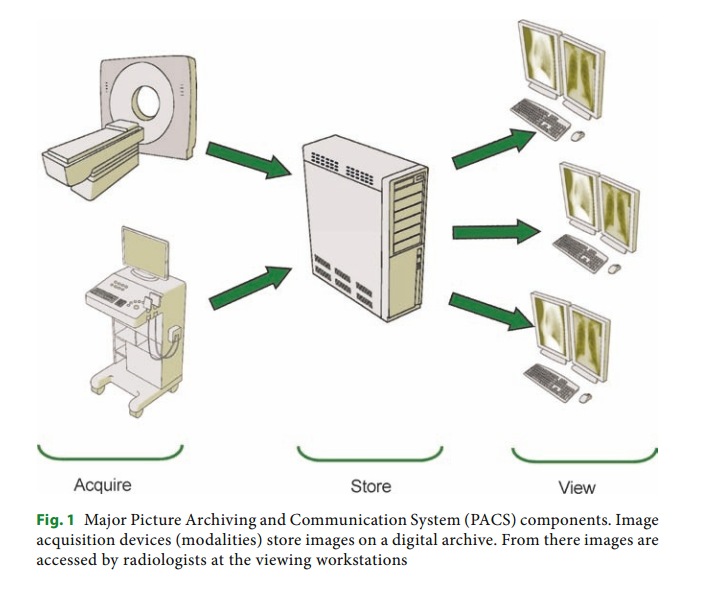
PACS Components

DICOM - Digital Imaging and Communication in Medicine
PACS - Picture Archiving and Communication System

Fodicom的Sample分析

1
2
3
4
5
6
7
8
9
10
11
12
13
14
15
16
17
18
19
//Sample Project: C-Store SCP
var server = DicomServer.Create<CStoreSCP>(port);//启动了监听

//Sample Project: ConsoleTest
var client = new DicomClient();
client.NegotiateAsyncOps();
for (int i = 0; i < 10; i++)
{
client.AddRequest(new DicomCEchoRequest());
}

client.AddRequest(new DicomCStoreRequest(@"test1.dcm"));
client.AddRequest(new DicomCStoreRequest(@"test1.dcm") {
OnResponseReceived = (DicomCStoreRequest req, DicomCStoreResponse rsp) => {
Console.WriteLine("{0}: {1}", req.SOPInstanceUID, rsp.Status);
}
});

client.Send("127.0.0.1", 11112, false, "SCU", "STORESCP"); // Client是在Send的时候才加入的ip地址和端口

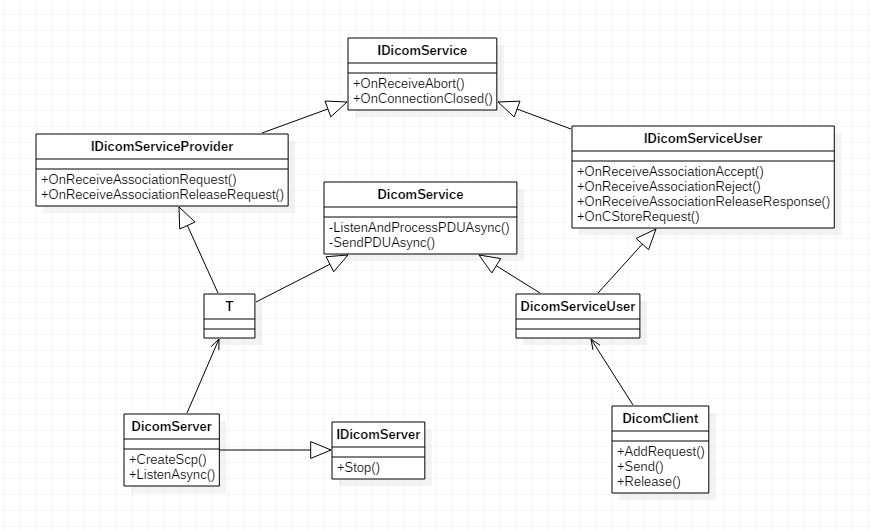
DicomServer和DicomClient的类图结构如下:

Server端叫做Service Class Provider, Client端叫做Service Class User, 二者之间建立连接, 叫做Association

在DCMTK中, 传DICOM到工作站和PACS用的程序是storescp.exe和storescu.exe

二者之间通信分为3层:

  1. socket
  2. Association(Accept,Release等, 术语叫做ACSE, Association Control Service Element)
  3. Command(Find, Store等Command, 术语叫做DIMSE, DICOM Message Service Element)

具体的收发包由DicomService完成, DicomService和IDicomService没有直接联系

DicomServer的创建

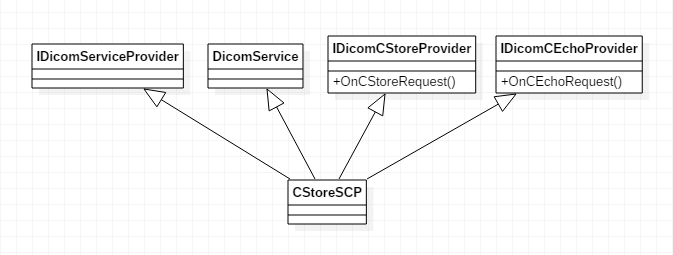
CStoreSCP就是类图中的T, T除了继承DicomService和IDicomServiceProvider的通用接口外, 还需要实现特有Service的接口. CStoreSCP的类图如下:

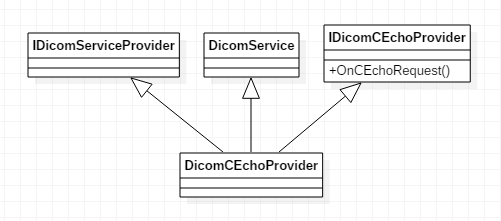
如此, DicomServer就能够提供Echo服务和Store服务; 需要说明的是CStoreSCP是样例中实现的, FoDicom本身没有提供;FoDicom只给出了DicomCEchoProvider的实现, 其他类型的服务只是给出了接口, 具体实现交由业务去做

Client端

client.AddRequest(new DicomCEchoRequest());
client.AddRequest(new DicomCStoreRequest(@”test1.dcm”));

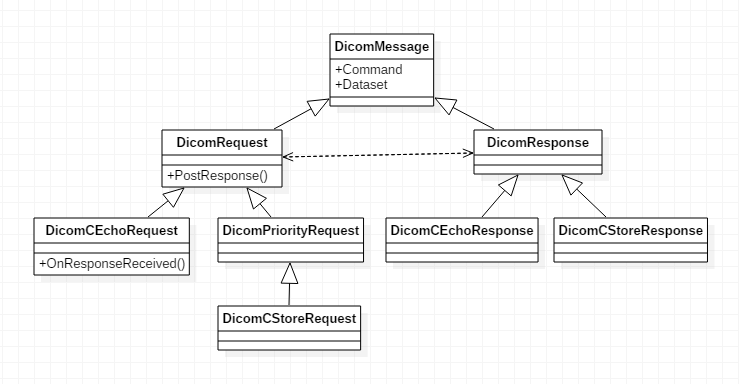
DicomCEchoRequest和DicomCStoreRequest属于Command
DicomCEchoRequest和DicomCStoreRequest相关的类图如下:

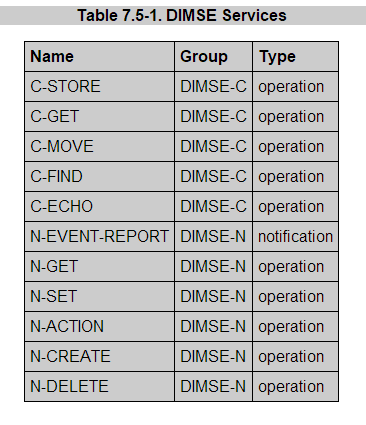
DicomMessage中包含Command和Dataset. DIMSE分为2类:
DIMSE-N: those services applicable to Normalized(普通的) SOP Instances
DIMSE-C: those services applicable to Composite(复合的) SOP Instances

DIMSE-N服务其中一个应用是DICOM打印, 常用的是DIMSE-C服务.

DIMSE-C服务介绍

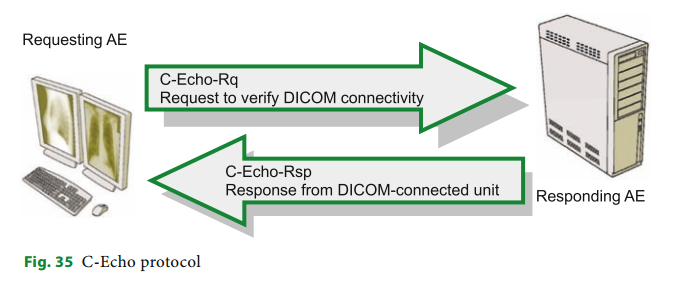
C-Echo: Ping

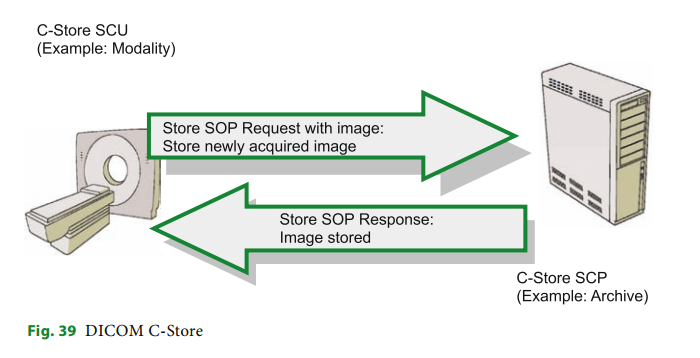
C-Store: 传DICOM到PACS归档

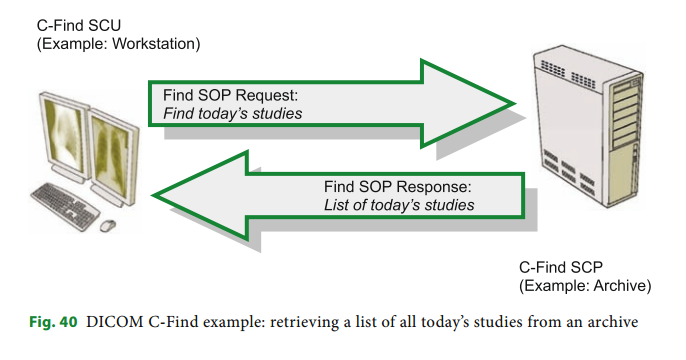
C-Find: 查询病人的信息

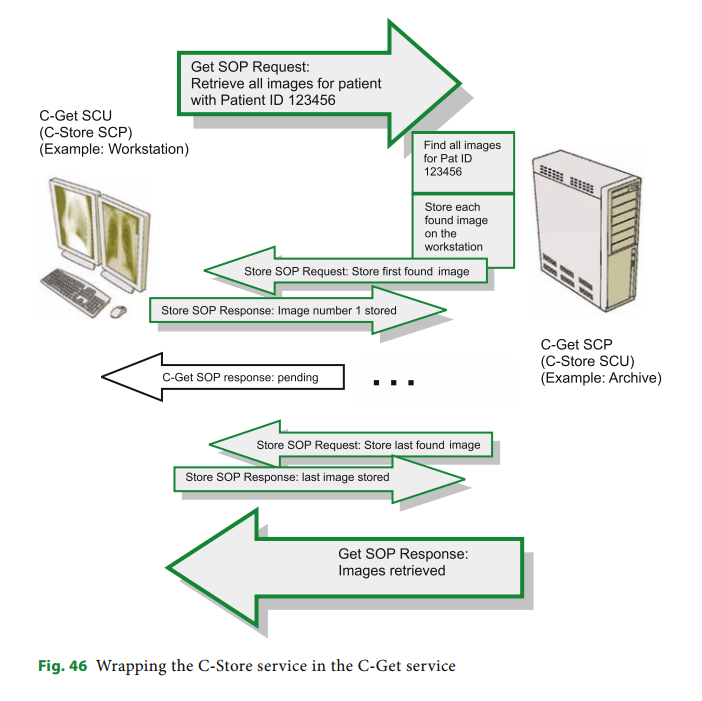
C-Get: 获取病人的DICOM, C-Get blends C-Find and C-Store into a single service class

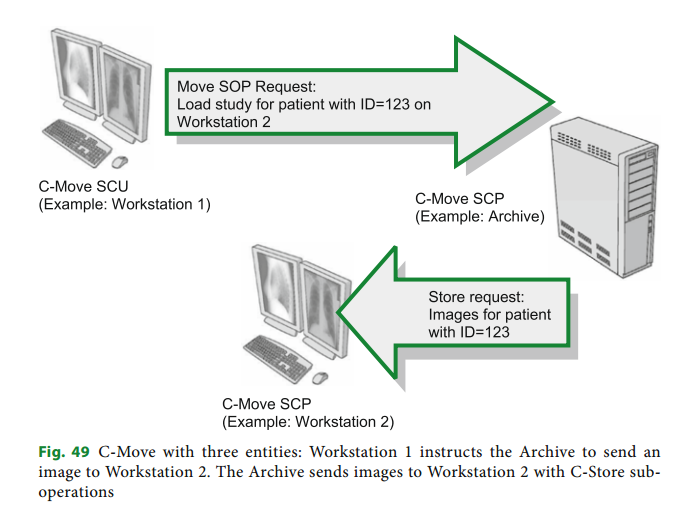
C-Move: 将一个PACS上的DICOM移动到另一个地方, 也是复合操作

除了C-Echo和C-Store有样例外, FoDicom没有提供其他几个SCP的具体实现;

C-Get SCP的实现参考:
http://blog.csdn.net/zssureqh/article/details/50334735

C-FIND and C-MOVE SCP的实现参考:
http://blog.csdn.net/zssureqh/article/details/41631563

Client的Send方法

client.Send(“127.0.0.1”, 11112, false, “SCU”, “STORESCP”);

  1. 构造NetworkStream
  2. 构造DicomAssociation
  3. DoSendAsync(networkstream, dicomassociation)

DoSendAsync是DicomClient的重点

  1. 构造DicomServiceUser
  2. SendRequest(request)
构造DicomServiceUser

DicomServiceUser的构造方法中, 调用SendAssociationRequest(association), 进行与Server端的连接
SendAssociationRequest调用SendPDUAsync(new AAssociateRQ(Association));

这里出现PDU和AAssociateRQ

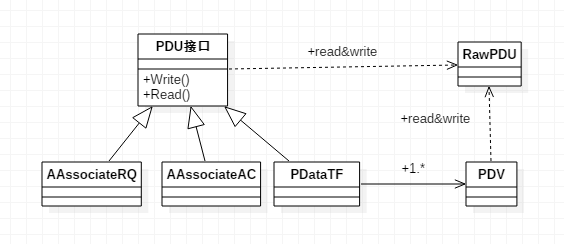
PDU和AAssociateRQ的类图如下:

AAssociateRQ是PDU的一种, PDU叫做Protocol Data Unit

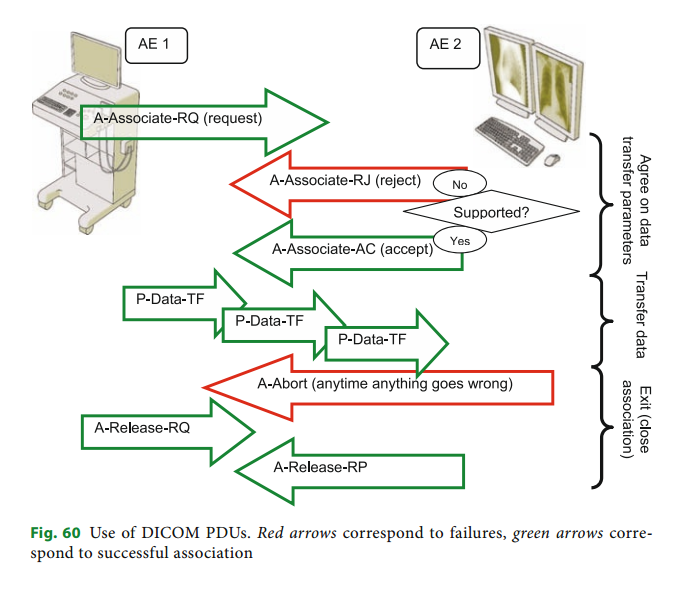
  1. A-Associate-RQ PDU: requests DICOM association.
  2. A-Associate-AC PDU: accepts DICOM association.(in response to A-Associate-RQ).
  3. A-Associate-RJ PDU: rejects DICOM association. (in response to A-Associate-RQ).
  4. P-Data-TF PDU: transfers a block of DICOM data.
  5. A-Release-RQ PDU: requests association termination (release).
  6. A-Release-RP PDU: responds to an association termination request(release).
  7. A-Abort PDU: aborts any invalid association

Use of Dicom PDUs

其中P-Data-TF is different from the other PDU types we just considered; it is the only type responsible for transmitting the actual data. P-Data-TF sends our DICOM objects, cut into chunks known as “Protocol Data Value” (PDV) items. 前面介绍的DIMSE是以P-Data-TF类型的PDU进行传输的

上面介绍的是1.构造DicomServiceUser
接下来介绍2. SendRequest(request)
SendRequest涉及到DicomService, 比较复杂, 见FODICOM传输笔记(二)

MonoGame笔记(二)SpriteBatch

Posted on 2017-12-01 | In 编程

SpriteBatch的Draw和DrawString

1
2
3
4
5
6
7
8
9
10
11
12
13
14
15
16
17
18
19
20
21
22
23
24
25
26
27
28
29
30
31
32
33
34
35
36
37
38
39
40
41
42
43
44
45
46
47
48
49
50
51
52
53
54
55
56
57
58
59
60
61
62
63
64
65
66
67
68
69
70
71
public void Draw (Texture2D texture, Rectangle rectangle, Color color)
{
if (texture == null )
{
throw new ArgumentException("texture");
}

SpriteBatchItem item = _batcher.CreateBatchItem();

item.Depth = 0;
item.TextureID = (int) texture.ID;

Vector2 texCoordTL = texture.Image.GetTextureCoord ( 0, 0 );
Vector2 texCoordBR = texture.Image.GetTextureCoord ( texture.Image.ImageWidth, texture.Image.ImageHeight );

item.Set
(
rectangle.X,
rectangle.Y,
rectangle.Width,
rectangle.Height,
color,
texCoordTL,
texCoordBR
);
}


public void DrawString(SpriteFont spriteFont, string text, Vector2 position, Color color)
{
if (spriteFont == null )
{
throw new ArgumentException("spriteFont");
}

Vector2 p = position;

foreach (char c in text)
{
if (c == '\n')
{
p.Y += spriteFont.LineSpacing;
p.X = position.X;
continue;
}
if (spriteFont.characterData.ContainsKey(c) == false)
continue;
GlyphData g = spriteFont.characterData[c];

SpriteBatchItem item = _batcher.CreateBatchItem();

item.Depth = 0.0f;
item.TextureID = (int) spriteFont._texture.ID;

Vector2 texCoordTL = spriteFont._texture.Image.GetTextureCoord ( g.Glyph.X, g.Glyph.Y );
Vector2 texCoordBR = spriteFont._texture.Image.GetTextureCoord ( g.Glyph.X+g.Glyph.Width, g.Glyph.Y+g.Glyph.Height );

item.Set
(
p.X,
p.Y+g.Cropping.Y,
g.Glyph.Width,
g.Glyph.Height,
color,
texCoordTL,
texCoordBR
);

p.X += (g.Kerning.Y + g.Kerning.Z + spriteFont.Spacing);
}
}

SpriteBatchItem item = _batcher.CreateBatchItem();
其实是从对象”池”中取一个; 三者关系如下: SpriteBatchItem的结构可以参考

1
2
3
4
5
6
7
8
9
10
11
12
13
14
15
16
17
18
_batchItemList = new SpriteBatchItem[InitialBatchSize];//初始化

public SpriteBatchItem CreateBatchItem()
{
if (_batchItemCount >= _batchItemList.Length)
{
var oldSize = _batchItemList.Length;
var newSize = oldSize + oldSize/2; // grow by x1.5
newSize = (newSize + 63) & (~63); // grow in chunks of 64.
Array.Resize(ref _batchItemList, newSize);
for(int i=oldSize; i<newSize; i++)
_batchItemList[i]=new SpriteBatchItem();

EnsureArrayCapacity(Math.Min(newSize, MaxBatchSize));
}
var item = _batchItemList[_batchItemCount++];
return item;
}

什么时候进行绘制呢?在调用End的时候

1
2
3
4
5
6
7
8
9
public void End ()
{
_beginCalled = false;

if (_sortMode != SpriteSortMode.Immediate)
Setup();

_batcher.DrawBatch(_sortMode, _effect);
}

DrawBatch其中一段代码

1
2
3
4
5
6
7
8
9
10
11
12
13
14
15
16
17
18
foreach ( SpriteBatchItem item in _batchItemList )
{
// if the texture changed, we need to flush and bind the new texture
if ( item.TextureID != texID )
{
FlushVertexArray( startIndex, index );
startIndex = index;
texID = item.TextureID;
GL.BindTexture ( All.Texture2D, texID );
}
// store the SpriteBatchItem data in our vertexArray
_vertexArray[index++] = item.vertexTL;
_vertexArray[index++] = item.vertexTR;
_vertexArray[index++] = item.vertexBL;
_vertexArray[index++] = item.vertexBR;

_freeBatchItemQueue.Enqueue ( item );
}

1
2
3
4
5
6
void FlushVertexArray ( int start, int end )
{
// draw stuff
if ( start != end )
GL.DrawElements ( All.Triangles, (end-start)/2*3, All.UnsignedShort,(IntPtr)((uint)_indexHandle.AddrOfPinnedObject()+(uint)(start/2*3*sizeof(short))) );
}

GL.DrawElements调用的是OpenTK

MonoGame笔记(一)入口

Posted on 2017-12-01 | In 编程

入口

1
2
3
4
5
6
7
8
9
10
static class Program
{
static void Main(string[] args)
{
using (Game1 game = new Game1())
{
game.Run();
}
}
}

Game.Run()调用Platform.RunLoop()
internal GamePlatform Platform;
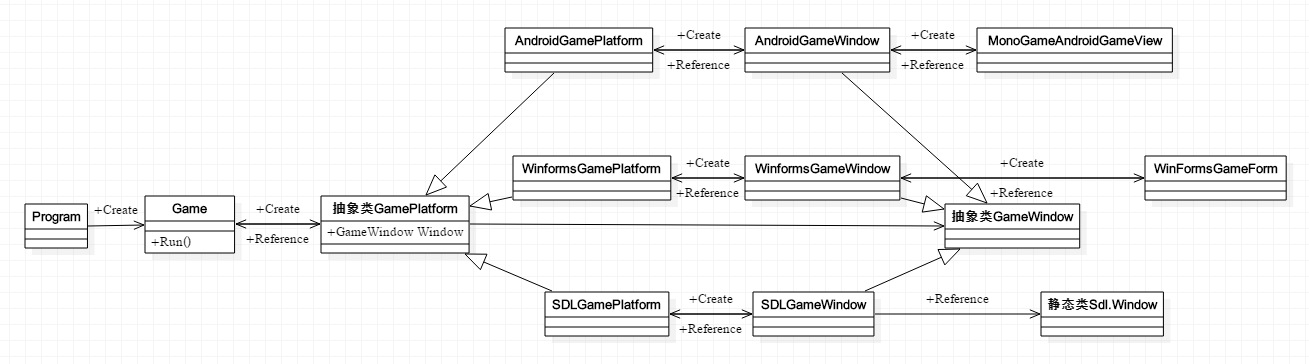
GamePlatform 是抽象类. 如果是Windows平台, 则是WinFormsGamePlatform
WinFormsGamePlatform的RunLoop

1
2
3
4
5
6
public override void RunLoop()
{
_window.RunLoop();
}

private WinFormsGameWindow _window;

WinFormsGameWindow中有WinFormsGameForm
进入WinFormsGameWindow的RunLoop, 看到PeekMessage, 看到Game.Tick()

1
2
3
4
5
6
7
8
9
10
11
12
13
14
15
16
17
18
19
20
21
22
23
24
25
26
27
28
29
30
31
32
33
34
35
36
37
38
39
40
41
42
43
internal void RunLoop()
{
// https://bugzilla.novell.com/show_bug.cgi?id=487896
// Since there's existing bug from implementation with mono WinForms since 09'
// Application.Idle is not working as intended
// So we're just going to emulate Application.Run just like Microsoft implementation
_form.Show();

var nativeMsg = new NativeMessage();
while (_form != null && _form.IsDisposed == false)
{
if (PeekMessage(out nativeMsg, IntPtr.Zero, 0, 0, 0))
{
Application.DoEvents();

if (nativeMsg.msg == WM_QUIT)
break;

continue;
}

UpdateWindows();
Game.Tick();
}

// We need to remove the WM_QUIT message in the message
// pump as it will keep us from restarting on this
// same thread.
//
// This is critical for some NUnit runners which
// typically will run all the tests on the same
// process/thread.

var msg = new NativeMessage();
do
{
if (msg.msg == WM_QUIT)
break;

Thread.Sleep(100);
}
while (PeekMessage(out msg, IntPtr.Zero, 0, 0, 1));
}

回到Game的Tick函数, 里面调用了DoUpdate和DoDraw

1
2
3
4
5
6
7
8
9
10
11
12
13
14
15
16
17
18
19
20
21
22
23
24
25
26
27
28
29
30
31
32
33
34
35
36
37
38
39
40
41
42
43
44
45
46
47
48
49
50
51
52
53
54
55
56
57
58
59
60
61
62
63
64
65
66
67
68
69
70
71
72
73
74
75
76
77
78
79
80
81
82
83
84
85
86
87
88
89
90
91
92
        public void Tick()
{
// NOTE: This code is very sensitive and can break very badly
// with even what looks like a safe change. Be sure to test
// any change fully in both the fixed and variable timestep
// modes across multiple devices and platforms.

RetryTick:

// Advance the accumulated elapsed time.
var currentTicks = _gameTimer.Elapsed.Ticks;
_accumulatedElapsedTime += TimeSpan.FromTicks(currentTicks - _previousTicks);
_previousTicks = currentTicks;

// If we're in the fixed timestep mode and not enough time has elapsed
// to perform an update we sleep off the the remaining time to save battery
// life and/or release CPU time to other threads and processes.
if (IsFixedTimeStep && _accumulatedElapsedTime < TargetElapsedTime)
{
var sleepTime = (int)(TargetElapsedTime - _accumulatedElapsedTime).TotalMilliseconds;

// NOTE: While sleep can be inaccurate in general it is
// accurate enough for frame limiting purposes if some
// fluctuation is an acceptable result.
#if WINRT
Task.Delay(sleepTime).Wait();
#else
System.Threading.Thread.Sleep(sleepTime);
#endif
goto RetryTick;
}

// Do not allow any update to take longer than our maximum.
if (_accumulatedElapsedTime > _maxElapsedTime)
_accumulatedElapsedTime = _maxElapsedTime;

if (IsFixedTimeStep)
{
_gameTime.ElapsedGameTime = TargetElapsedTime;
var stepCount = 0;

// Perform as many full fixed length time steps as we can.
while (_accumulatedElapsedTime >= TargetElapsedTime)
{
_gameTime.TotalGameTime += TargetElapsedTime;
_accumulatedElapsedTime -= TargetElapsedTime;
++stepCount;

DoUpdate(_gameTime);
}

//Every update after the first accumulates lag
_updateFrameLag += Math.Max(0, stepCount - 1);

//If we think we are running slowly, wait until the lag clears before resetting it
if (_gameTime.IsRunningSlowly)
{
if (_updateFrameLag == 0)
_gameTime.IsRunningSlowly = false;
}
else if (_updateFrameLag >= 5)
{
//If we lag more than 5 frames, start thinking we are running slowly
_gameTime.IsRunningSlowly = true;
}

//Every time we just do one update and one draw, then we are not running slowly, so decrease the lag
if (stepCount == 1 && _updateFrameLag > 0)
_updateFrameLag--;

// Draw needs to know the total elapsed time
// that occured for the fixed length updates.
_gameTime.ElapsedGameTime = TimeSpan.FromTicks(TargetElapsedTime.Ticks * stepCount);
}
else
{
// Perform a single variable length update.
_gameTime.ElapsedGameTime = _accumulatedElapsedTime;
_gameTime.TotalGameTime += _accumulatedElapsedTime;
_accumulatedElapsedTime = TimeSpan.Zero;

DoUpdate(_gameTime);
}

// Draw unless the update suppressed it.
if (_suppressDraw)
_suppressDraw = false;
else
{
DoDraw(_gameTime);
}
}

类层次结构如下:

另外也查看了一下XNA中Game类的相关类结构
public Game.Run()调用private Game.RunGame(), 后者调用 this.host.StartGameLoop();

host是GameHost, GameHost是抽象类, 具体是WindowsGameHost;WindowsGameHost内有WindowsGameWindow, WindowsGameWindow内有WindowsGameForm

WindowGameHost的Run方法

1
2
3
4
5
6
7
8
9
10
11
12
13
14
15
16
17
18
internal override void Run()
{
if (this.doneRun)
{
throw new InvalidOperationException(Resources.NoMultipleRuns);
}
try
{
Application.Idle += new EventHandler(this.ApplicationIdle);
Application.Run(this.gameWindow.Form);//winform的形式
}
finally
{
Application.Idle -= new EventHandler(this.ApplicationIdle);
this.doneRun = true;
base.OnExiting();
}
}

这里XNA和MonoGame是一一对应的
GameHost = GamePlatform
WindowsGameHost = WinFormsGamePlatform
WindowsGameWindow = WinFormsGameWindow
WindowsGameForm = WinFormsGameForm

Game实现了游戏的大体框架, 或者说模板. 用户只要继承Game类, 将实现逻辑放入相应的虚方法Update和Draw中, 就可以进行逻辑更新和图形绘制. 这两个虚方法由Game的Tick方法组合起来. 那么需要有一个地方调用Game的Tick方法, 这个地方就是Windows的消息循环

过程由Game.Run进入, 经过GamePlatform, 直至GameWindow的消息循环, 此处再调用Game.Tick, 饶了一圈回到Game. Game虽然是Facade, 里面什么都有, 但唯独少了一个心脏, 需要借助外力. 这种设计方式可以学习.

2D Visualization笔记(X3) DynamicDataDisplay(sl)(七)

Posted on 2017-02-04 | In 编程

官方
http://research.microsoft.com/en-us/um/cambridge/groups/science/tools/d3/dynamicdatadisplay.htm

Tutorial
http://research.microsoft.com/en-us/um/cambridge/projects/ddd/d3isdk/

D3Overview 必读
http://research.microsoft.com/en-us/um/cambridge/groups/science/tools/d3/D3Overview.pdf

Sliverlight版本: DynamicDataDisplay.2.0.907

Dynamic Data Display 的Sliverlight版本和Wpf版本中的代码不一样.


Dynamic Markers: background computations

方式和笔记(三)一样
xaml

1
2
3
4
5
6
7
8
9
10
11
12
13
14
15
16
17
18
19
20
<!-- Copyright © 2010-2011 Microsoft Corporation, All Rights Reserved.
-->
<UserControl x:Class="DynamicMarkerGraphSample.MainPage"
xmlns="http://schemas.microsoft.com/winfx/2006/xaml/presentation"
xmlns:x="http://schemas.microsoft.com/winfx/2006/xaml"
xmlns:d="http://schemas.microsoft.com/expression/blend/2008"
xmlns:mc="http://schemas.openxmlformats.org/markup-compatibility/2006"
xmlns:d3="clr-namespace:Microsoft.Research.DynamicDataDisplay;assembly=DynamicDataDisplay.Silverlight"
mc:Ignorable="d"
d:DesignHeight="300" d:DesignWidth="400">

<Grid x:Name="LayoutRoot" Background="White">
<d3:Chart Name="plotter">
<d3:Chart.Title>
<TextBlock HorizontalAlignment="Center" FontSize="14" Margin="0,5,0,5">Background computations sample</TextBlock>
</d3:Chart.Title>
<d3:CircleMarkerGraph Name="markers" Description="Sine graph" Color="Red" Size="5"/>
</d3:Chart>
</Grid>
</UserControl>

cs

1
2
3
4
5
6
7
8
9
10
11
12
13
14
15
16
17
18
19
20
21
22
23
24
25
26
27
28
29
30
31
32
33
34
35
36
37
38
39
40
41
42
43
44
45
46
47
48
49
50
51
52
53
54
55
56
57
58
59
60
61
62
63
64
65
66
67
68
69
70
71
72
73
74
75
76
77
// Copyright © 2010-2011 Microsoft Corporation, All Rights Reserved.

using System;
using System.Reactive.Linq;
using System.Threading;
using System.Windows.Controls;

namespace DynamicMarkerGraphSample
{
public partial class MainPage : UserControl
{
private volatile bool isUnloaded = false;
private AutoResetEvent renderComplete = new AutoResetEvent(false);
private Thread thread;
private double phase = 0;

const int N = 1000;
double[] y = new double[N];

public MainPage()
{
InitializeComponent();
markers.MarkersBatchSize = 1000;

// Start computation thread when Page appears on the screen
Loaded += (s, e) =>
{
thread = new Thread(ModelRun);
isUnloaded = false;
thread.Start();
};

// Stop computation thread when Page is removed from the screen
Unloaded += (s, e) =>
{
isUnloaded = true;
renderComplete.Set();
thread.Join();
};
}

private void ModelRun()
{
while (!isUnloaded)
{
// Data array is updated
for (int i = 0; i < N; i++)
y[i] = Math.Cos(i * Math.PI / 50 + phase);
phase += 0.1;

// Plot the computed array.
// PlotY and Subscribe methods must be called from the UI dispatcher thread.
// Unlike ConcurrentMarkerGraphSample here we wait for each frame to be rendered.
if (!isUnloaded)
{
renderComplete.Reset();
Dispatcher.BeginInvoke(PlotData);
renderComplete.WaitOne();
}
}
}

private void PlotData()
{
// To increase responsiveness of the UI HeatmapGraph objects prepare
// images to be drawn in a background thread. The Plot method cancels
// current incomplete images before starting a new one. This may result
// in loss of certain or even all of the frames.
// The following code shows how to wait until a certain data is actually drawn.

long id = markers.PlotY(y); // receive a unique operation identifier
markers.RenderCompletion // an observable of completed and cancelled operations
.Where(rc => rc.TaskId == id) // filter out an operation with the known id
.Subscribe(dummy => { renderComplete.Set(); }); // signal when the id is observed
}
}
}


This sample shows how to plot data that are computed in separated thread. Unlike ConcurrentMarkerGraphSample, in this sample computational thread waits for each frame to be rendered. This is achieved by observing RenderCompletion event and signaling when render operation with specific ID is completed (see ‘PlotData’ method for details).

1…4567

zmapleaf

67 posts
2 categories
11 tags
© 2020 zmapleaf
Powered by Hexo
|
Theme — NexT.Mist v5.1.4